

Windows 10 / 1114-day free trialTürkçe
Safe copying for Windows
Kopitan the captain of copying
Move your photos, videos and work off cards, SSDs and flash drives safely. Kopitan reads every file back from disk after writing it and verifies it. If a drive overheats, it pauses; if the connection drops, it waits. Once the problem is gone, it picks up right where it left off.
Windows 10 / 11 (64-bit) · Microsoft Store · Automatic updates · English & Turkish
Why Kopitan?
Windows says the copy is "done". Kopitan makes sure your files are actually intact.
When you move hundreds of gigabytes from a card to a drive, the Windows copy dialog doesn’t tell you three things:
01
Was the file written correctly?
A write cache, a loose cable or a worn-out card can silently leave a corrupt copy behind. Often you only find out months later, when the file won’t open.
02
Is the drive overheating?
Fast NVMe enclosures and card readers heat up during long transfers. A hot drive first slows down, then may drop the connection.
03
What happened when the connection dropped?
The copy stops halfway. Working out which files are complete and which are partial is left to you.
Kopitan asks these three questions for you and acts on the answers.
Features
Everything safe copying needs, in one window
01
Every file verified (SHA-256)
After writing each file, Kopitan reads it back from disk, bypassing the cache, and compares it with the source using SHA-256. A file that doesn’t match is copied again automatically, and you’re told if the problem persists.
02
Pauses when hot, resumes when cool
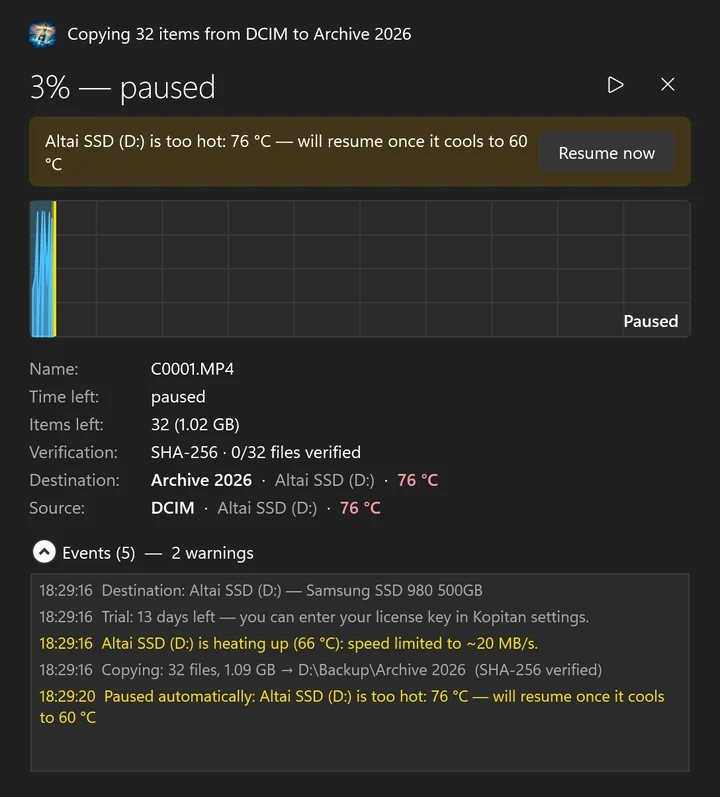
Kopitan watches the source and destination drive temperatures live. Near the limit it slows down; above the limit it pauses; once the drive cools, it continues on its own. The default limit is 70 °C.
03
Waits if the connection drops
If a cable comes loose or a card reader disconnects, Kopitan doesn’t give up. It waits for the device to return, rewrites the unfinished file and carries on.
04
No half-written files
Each file is first written under a temporary name and only gets its real name after passing verification. No “looks fine but is broken” files at the destination.
05
Catches stalls and disk errors
If the transfer stalls repeatedly or Windows logs a disk error, Kopitan shows it in the event list. If the problem keeps coming back, it takes a short break and continues more slowly.
06
Flags slow connections
If a fast USB device is accidentally running at USB 2.0 speed, Kopitan warns you. That’s usually the answer to “why is this so slow?”.
07
Checks before it starts
Is there enough free space? Are you copying files over 4 GB to a FAT32 drive? Kopitan checks this up front, so a job never dies halfway with “disk full”.
08
Lives inside File Explorer
The right-click menu gets Copy / Cut / Paste with Kopitan. If you like, Kopitan also steps in when you press Ctrl+V in File Explorer.
09
Familiar, clean window
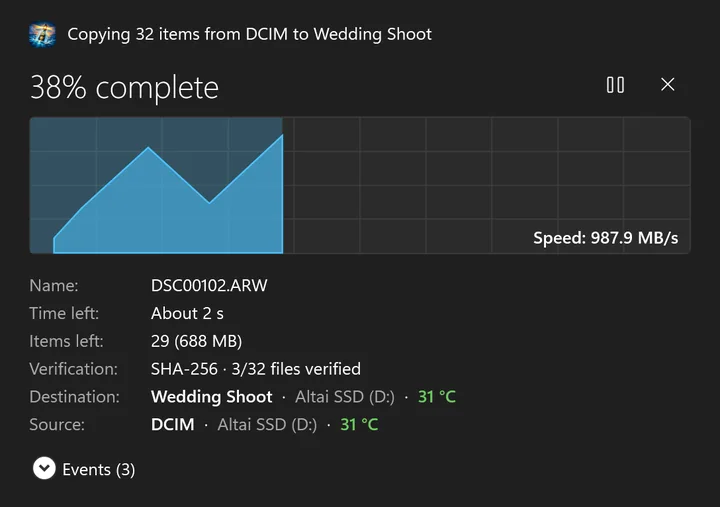
It looks like the Windows copy dialog. Live speed graph, time left, verified file count and drive temperatures at a glance.
10
A report for every job
At the end of every copy, Kopitan saves a report showing which files were copied, verified or skipped, and when it paused.
How it works
A safe copy in three steps
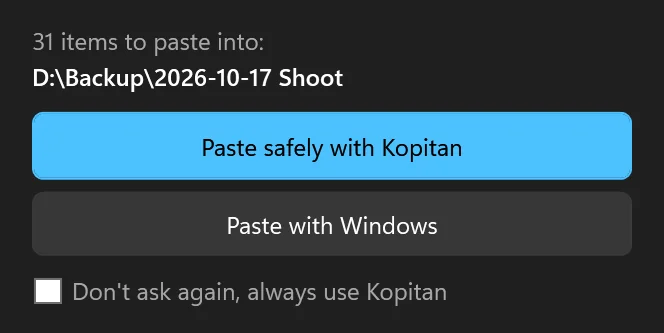
1 · Select
Select files or folders in File Explorer. Right-click and choose Copy with Kopitan, or simply press Ctrl+C as usual.
2 · Paste
In the destination folder, right-click and choose Paste with Kopitan, or press Ctrl+V.
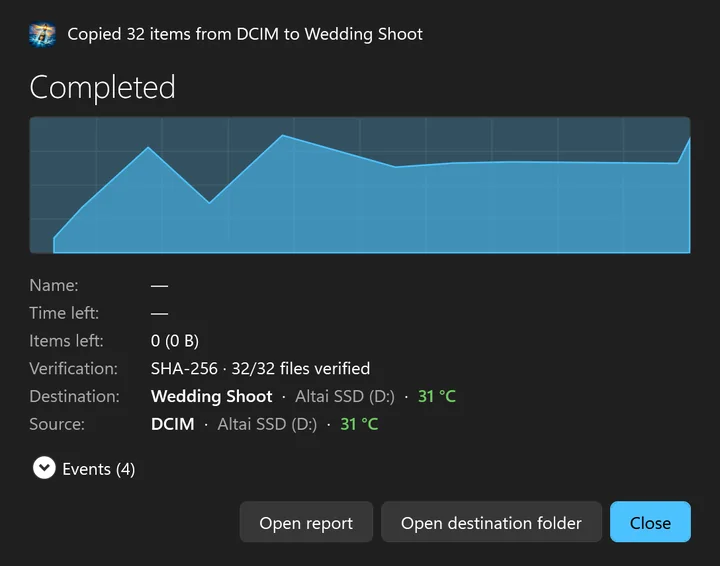
3 · Sit back
Kopitan copies, verifies and watches the drives, pausing and resuming when needed. When it’s done, you get a summary.
Heat protection
When your drive heats up, Kopitan hits the brakes
During long transfers, external NVMe enclosures and CFexpress readers can reach 70–80 °C. At that point the drive slows down to protect itself, and sometimes it drops the connection entirely. Kopitan reads the temperature every two seconds:
- Near the limit, it slows down to help the drive cool.
- Above the limit, it pauses the job and tells you exactly why: “Altai SSD (D:) is too hot: 76 °C — will resume once it cools to 60 °C”.
- Once the drive cools, it continues where it left off with no action from you.
- In a hurry? Resume now skips the wait.
Temperature monitoring works on drives that report their temperature. Most NVMe and SATA SSDs do; some USB flash drives and card readers don’t. On those, Kopitan keeps protecting you with verification, stall detection and disconnect handling.
Who it’s for
For anyone whose files matter
Photographers and videographers
Offload cards after a shoot knowing every frame arrived intact.
Editors and post-production
Move large project folders between drives with verification.
Anyone who makes backups
Know that the backup on your external drive will actually open.
Repair shops and IT
Transfer customer data and get a report at the end of the job.
Screenshots
Kopitan at a glance
Live speed graph, verification and temperature at a glance
Done, every file verified
Automatic pause when a drive overheats
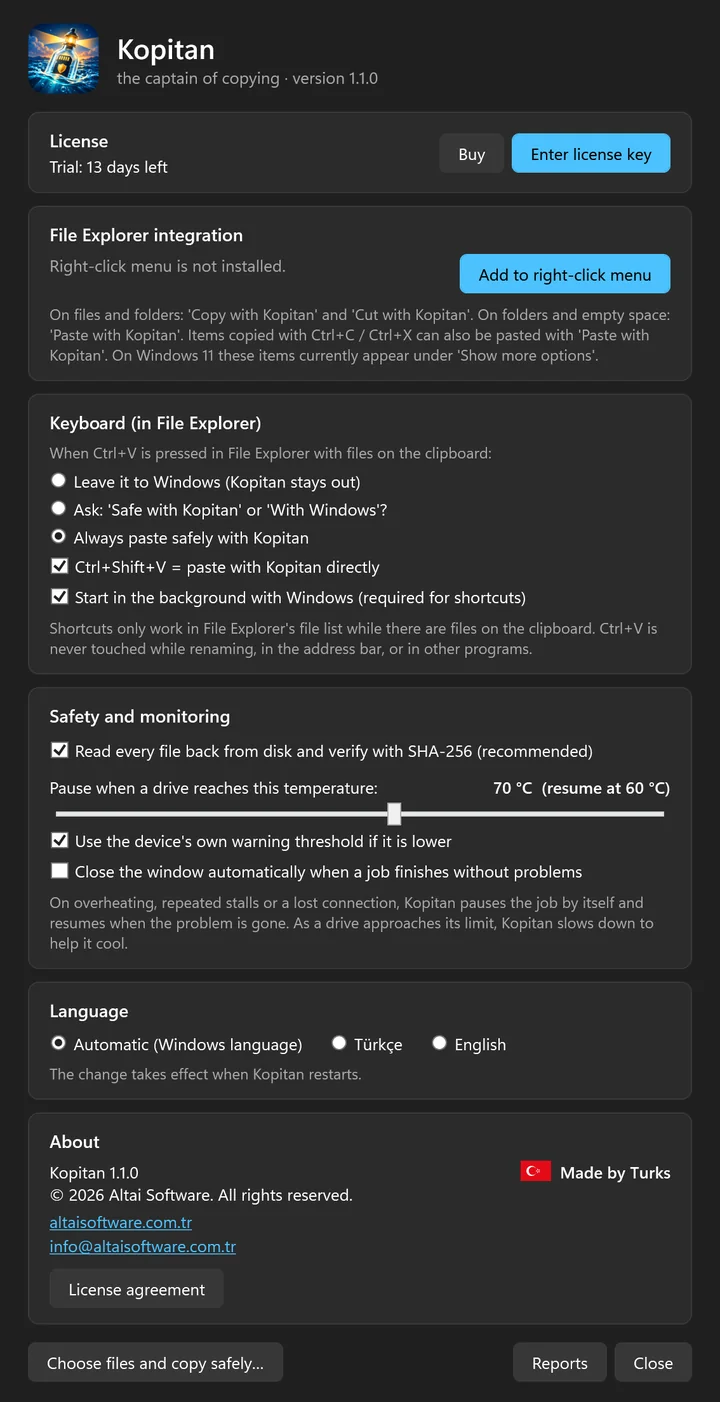
Everything in one settings window
Safe pasting with Ctrl+V
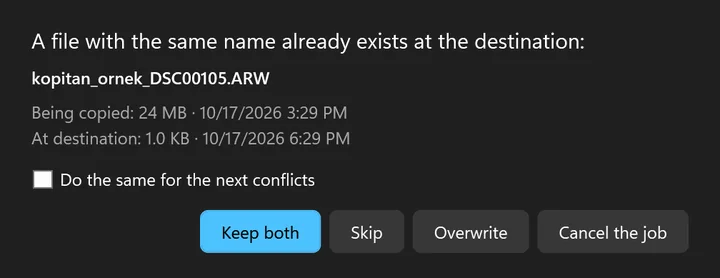
When a file with the same name exists
User guide
How to use
Installation
- Install Kopitan from the Microsoft Store. There is no setup wizard; the Store installs it for you.
- After the trial, click Subscribe yearly in Kopitan settings to subscribe.
Copying with the right-click menu
- Select files or folders in File Explorer and right-click.
- Choose Copy with Kopitan (or Cut with Kopitan to move).
- Go to the destination. Right-click an empty area or a folder and choose Paste with Kopitan.
On Windows 11: the Kopitan items appear directly in the right-click menu.
Copying with Ctrl+C / Ctrl+V
While Kopitan runs in the background, you can use Ctrl+C and Ctrl+V in File Explorer as usual. In settings you choose what Ctrl+V does:
- Ask: a small window lets you pick Paste safely with Kopitan or Paste with Windows.
- Always Kopitan: safe copying starts right away.
- Leave it to Windows: Windows handles Ctrl+V; you use Kopitan from the right-click menu or with Ctrl+Shift+V.
Kopitan only responds to these shortcuts in File Explorer’s file list while there are files on the clipboard. It never touches Ctrl+V while you rename a file, in the address bar, or in other programs.
The copy window
- The speed graph shows the transfer live, with time left and items left below it.
- The Verification line shows how many files have been verified with SHA-256.
- The Destination / Source lines show the folder, the drive and its current temperature.
- The Events list shows pauses, retries and warnings with timestamps.
- Use ⏸ / ▶ to pause and resume at any time, and ✕ to cancel.
When a file with the same name exists
If the destination already has a file with the same name, Kopitan shows the size and date of both and asks what to do: Keep both · Skip · Overwrite · Cancel the job. You can apply your choice to the next conflicts too.
Settings and language
Open Kopitan from the Start menu or click the Kopitan icon in the notification area. In settings you can change:
- Adding or removing the right-click menu
- What Ctrl+V does, and the Ctrl+Shift+V shortcut
- Starting with Windows
- SHA-256 verification (recommended, on)
- The pause temperature (default 70 °C, resumes 10 °C lower)
- Closing the window automatically after a job with no problems
- Language: Automatic (Windows language), Türkçe or English
Each job’s report is stored in the folder opened by the Reports button.
Uninstalling
Go to Windows Settings → Apps → Installed apps → Kopitan → Uninstall. Kopitan only removes its own files and never touches the files you copied.
Subscription
Try it free for 14 days, then subscribe if you like it
- Install Kopitan free from the Microsoft Store; all features are unlocked for 14 days, no card needed.
- After the trial, safe copying continues with an annual subscription, bought through the Microsoft Store; payment and receipts come from Microsoft.
- The subscription renews automatically each year; cancel anytime in your Microsoft account.
- The subscription is tied to your Microsoft account, so you can install Kopitan on your PCs with the same account.
- Updates arrive automatically through the Store, and on Windows 11 Kopitan appears directly in the right-click menu.
- When the trial ends, you can keep copying with Windows.
Kopitan annual subscription
Microsoft Store · renews yearly · cancel anytime
$9.99 / year
Shown in your local currency in the Microsoft Store; local taxes may apply.
- Install on your PCs with your Microsoft account
- All updates (automatic)
- Email support
- 14-day free trial, no card needed
Payment, receipts, renewals and refunds are handled by the Microsoft Store. For business, invoiced or volume (5+) licenses, write to us.
Download
Download Kopitan
Microsoft Store
Trusted install · automatic updates · right in the Windows 11 context menu · free trial

System requirements
What Kopitan needs
| Operating system | Windows 10 (64-bit) or Windows 11 |
|---|---|
| Processor | x64 (Intel / AMD) |
| Disk space | ~150 MB |
| Permissions | No admin rights needed (per-user install) |
| Internet | For installation and the subscription (Microsoft Store) |
| Languages | English and Turkish |
| Temperature monitoring | On drives that report temperature (most NVMe / SATA SSDs) |
FAQ
Frequently asked questions
Is Kopitan slower than Windows copying?
Copy speed is usually the same as Windows. With verification on, each file is read from disk once more, so the whole job takes a bit longer. In exchange, you won’t discover a corrupt copy months later. If speed matters more to you, you can turn verification off in settings.
Which drives does it work with?
Any drive Windows assigns a letter to: internal and external HDDs/SSDs, NVMe enclosures, CFexpress / SD card readers, USB flash drives and network folders. Temperature monitoring only works on drives that report their temperature.
My drive doesn't show a temperature. Is Kopitan still useful?
Yes. Verification, no half-written files, stall detection and waiting on disconnects work on every drive.
What happens if the cable comes out mid-copy?
Kopitan doesn’t cancel the job; it waits for the device to be plugged back in. When it returns, the unfinished file is rewritten from the start and the copy continues. No partial files are left at the destination.
I can't see Kopitan in the right-click menu on Windows 11.
Check that the right-click menu is turned on in Kopitan settings; when it is, the items appear directly in the Windows 11 menu. Meanwhile you can still copy safely with Ctrl+C / Ctrl+V. If the problem continues, write to us.
Does it affect Ctrl+V in other programs?
No. Kopitan only steps in in File Explorer’s file list while there are files on the clipboard. Pasting text, renaming files and other programs are unaffected.
How many computers can I use my subscription on?
Your subscription is tied to your Microsoft account, and you can install Kopitan on your PCs with the same account under the Store’s device rules.
Does it need an internet connection?
Not for copying. Installation and the subscription go through the Microsoft Store and need an internet connection.
Are my files sent anywhere?
No. Kopitan never sends the contents or names of your files anywhere. Drive temperature and health information is read only on your computer. See Privacy for details.
What happens to my files when the trial ends?
Nothing. Your copied files are yours. After the trial, Ctrl+V in File Explorer still works and Windows does the copying. Subscribe to get safe copying back.
Is Kopitan available in English and Turkish?
Yes. The language follows your Windows display language automatically, and you can change it under Settings → Language. The right-click menu follows the language you choose.
How do I cancel my subscription?
Cancel the Kopitan subscription on the Services & subscriptions page of your Microsoft account; the Manage subscription button in Kopitan settings opens that page. Cancellation takes effect at the end of the current subscription year, and Kopitan keeps working until then.
Can I get a refund?
You can try Kopitan for free before buying. Refunds for Microsoft Store purchases are handled by Microsoft under the Microsoft Store refund rules.
Does Kopitan replace a backup program?
No. Kopitan makes sure every file you copy is intact, but it doesn’t replace regular backups. Always keep important data in at least two separate places.
Is there a Mac or Linux version?
Not yet. Kopitan is available for Windows 10/11 only.
Privacy
Your files stay with you
Your files never leave your computer
Kopitan never sends the contents or names of the files you copy anywhere.
Drive information is read locally only
Temperature, connection speed and disk entries in the Windows event log are read on your computer only to make copying safe.
No ads, no tracking
Kopitan doesn’t collect usage statistics or show ads. The Microsoft Store edition sends nothing to our server; its license is verified by the Microsoft Store. Details: Privacy policy.
Release notes
What's new
1.1.0 · October 17, 2026 · First public release
Safe copying
- Every file is read back from disk, bypassing the cache, and verified with SHA-256. Files that don’t match are copied again automatically.
- Files are written under a temporary name and only renamed after passing verification. No partial files at the destination.
- Free space and FAT32 (4 GB file limit) checks before starting.
- Choices for same-name files: keep both, skip, overwrite.
- A detailed report is saved at the end of every job.
Live monitoring
- Source and destination drive temperatures checked every 2 seconds. Slows down near the limit, pauses above it, resumes when cool.
- Waits for a disconnected device to return and rewrites the unfinished file.
- Detects stalls, Windows disk errors and connections that dropped to USB 2.0.
Windows integration
- File Explorer right-click menu: Copy / Cut / Paste with Kopitan.
- Safe pasting with Ctrl+V in File Explorer, plus a Ctrl+Shift+V shortcut.
- Windows-style copy window with light and dark theme support.
- English and Turkish interface (follows the Windows language; changeable under Settings → Language).
Installation and subscription
- Installed from the Microsoft Store; updates arrive automatically through the Store. No admin rights or .NET installation required.
- 14-day free trial.
- Annual subscription after the trial. Purchase, payment, renewal and refunds go through the Microsoft Store, which also verifies the license.
Need help?
Send your question, suggestion or bug report. If you’re reporting a problem, attaching the copy report (Settings → Reports) helps us solve it much faster.