

Windows · macOSAndroid · iOSTürkçe
Keep the stats while you watch the game.
Tap the player, tap the stat: done. By the final whistle the box score, shot charts, game analysis and broadcast graphics are ready.





Windows, macOS, Android and iOS · Nine languages · Works offline · Free 3-day demo
Video
See TRPL-D Stats in action.
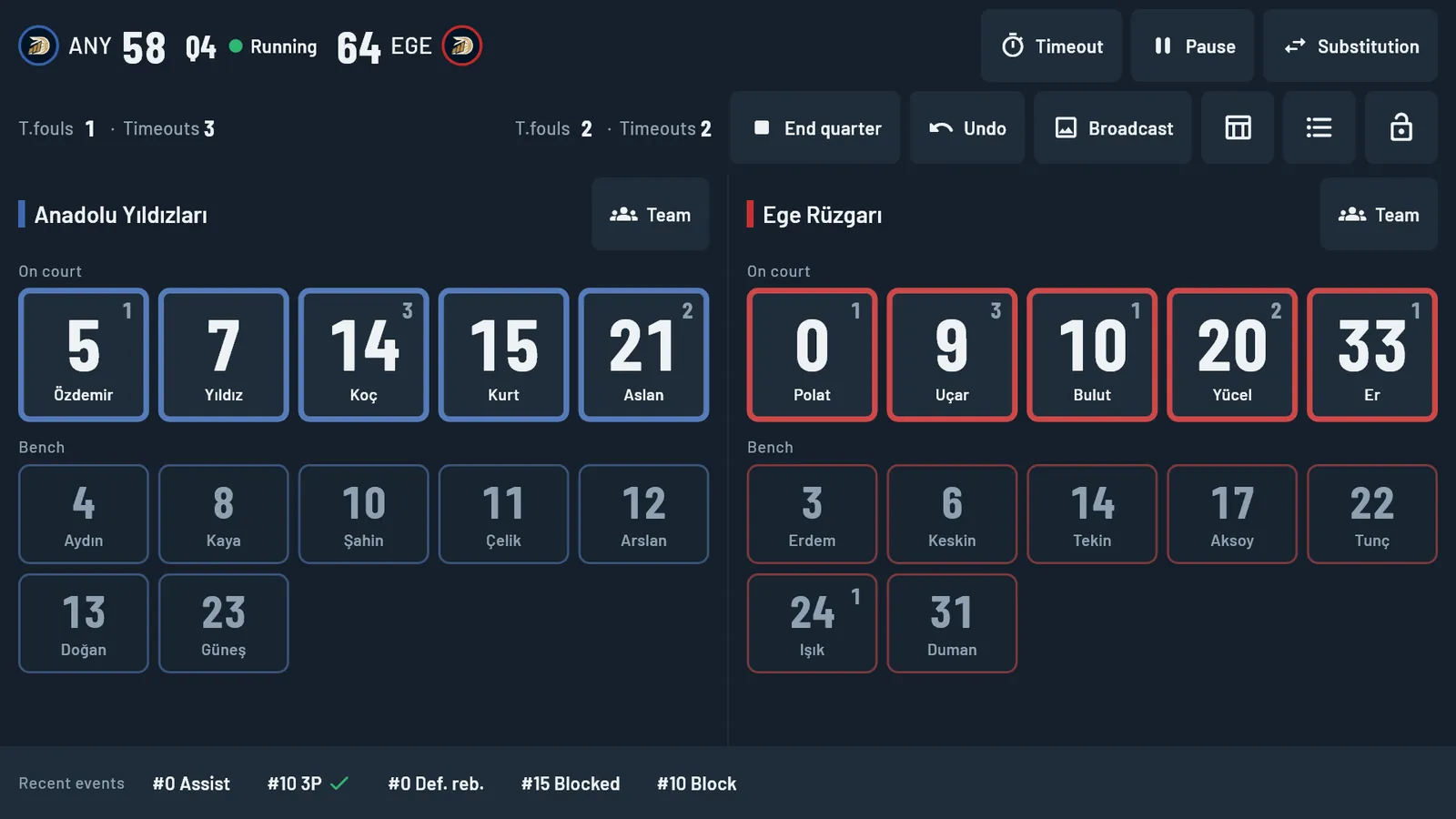
The problem
Pen-and-paper statistics cost you three things.
01
You miss the game
Your eyes are on the sheet; by the time you find the row, the play is over.
02
The totals do not add up
After the game the numbers do not match the score, and you cannot tell which row is wrong.
03
The real work starts afterwards
Typing the sheet into a spreadsheet, working out percentages and preparing a report takes your evening.
TRPL-D Stats gets all three done during the game, with one person.
How it works
A minute before the game, two taps during it, nothing left to do after.
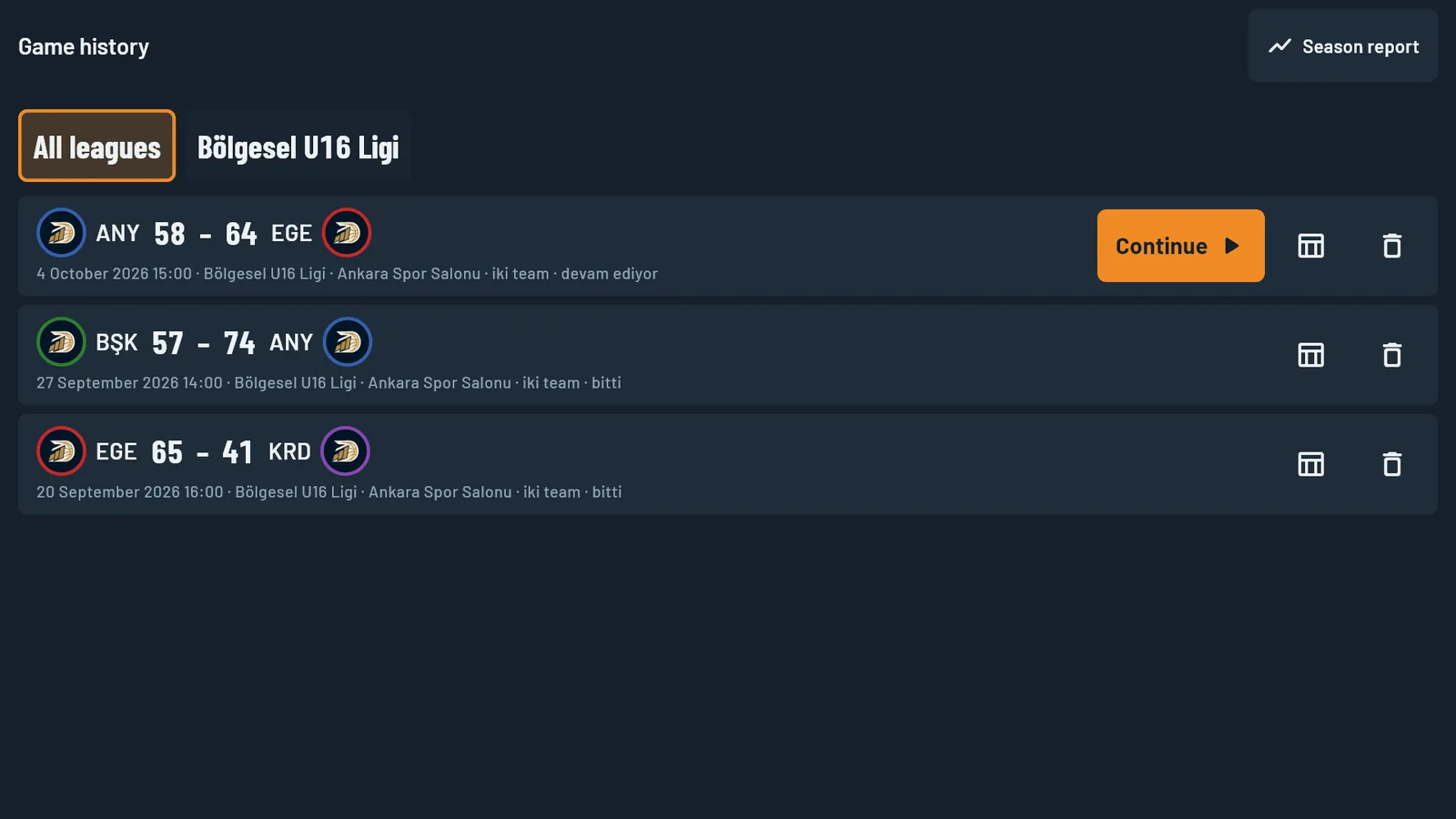
1 · Before the game
Set up your team once
Enter your club and teams once. On game day pick the opponent, type the jersey numbers and mark the starting five. Import your fixtures from a spreadsheet and a game opens in one tap.
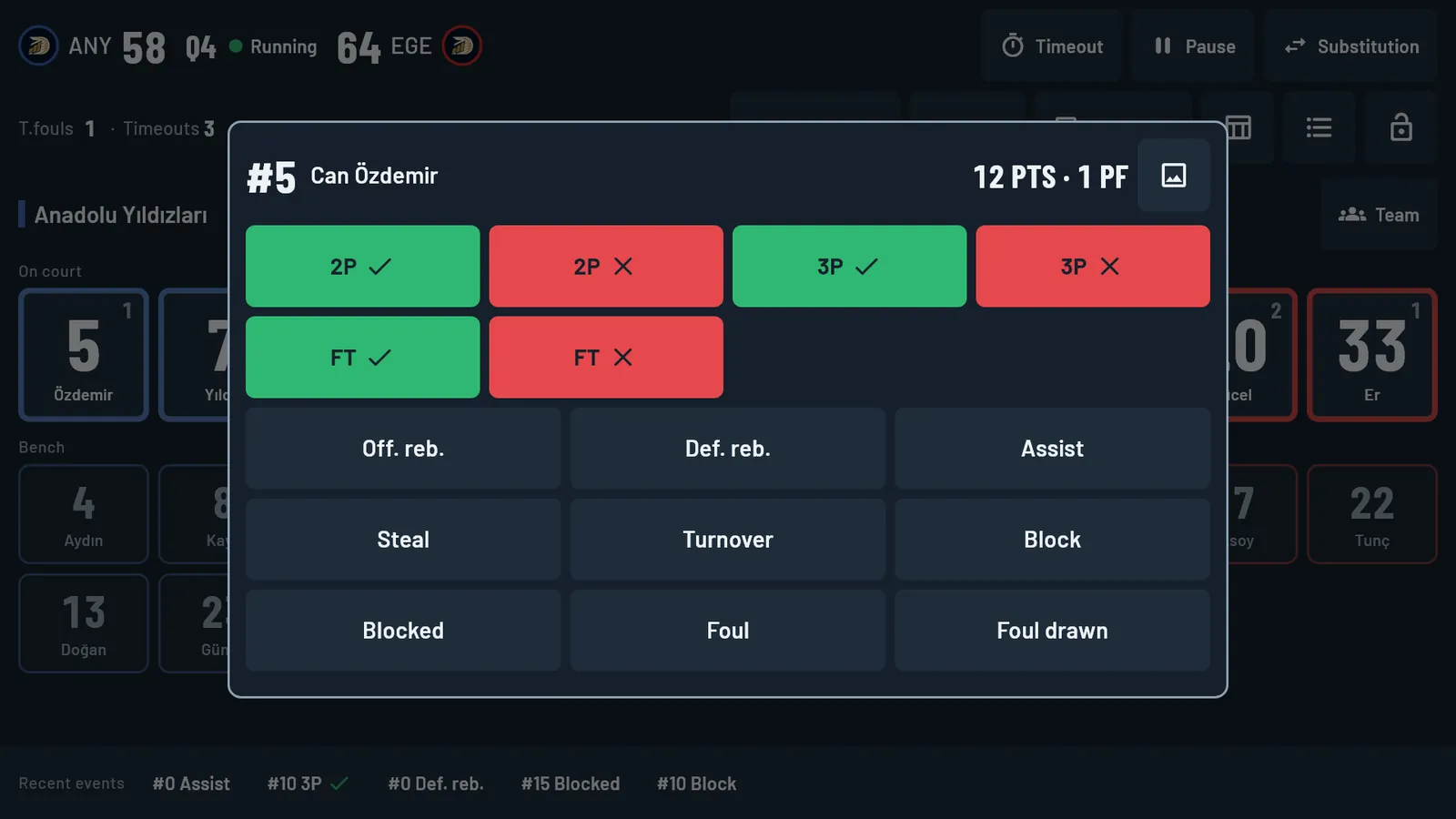
2 · During the game
Tap the player, tap the stat
No confirmation dialogs; every tap is saved instantly. For shots you tap the spot on the court. Made a mistake? Undo, or correct the event later. Totals, plus-minus and minutes are recalculated automatically.
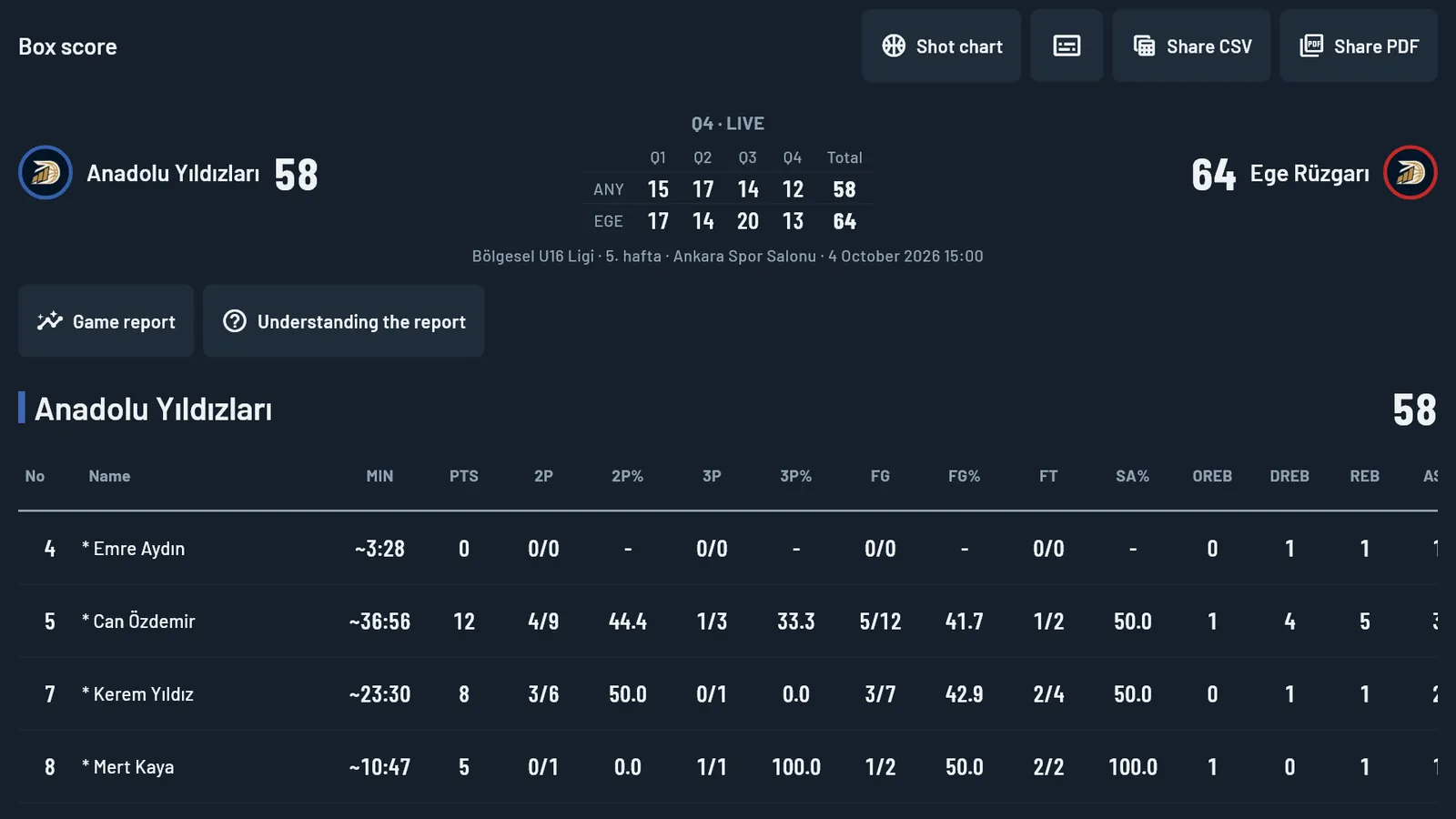
3 · After the game
The report is waiting
The box score, shot chart and analysis report are ready. Save them as PDF or CSV, export a broadcast graphic and move on to the next game.
How it works
Step-by-step tutorial videos.
Short videos that walk through the app topic by topic: watch, pause and do the same step in the app.
Tutorial videos are on the way. They will appear here, topic by topic, as they are published. You can already subscribe to our YouTube channel.
Computer, tablet, phone
Four roles, one game.
TRPL-D Stats runs on computers, tablets and phones. Three devices enter data: two people each enter one team’s stats, and a third keeps the clock. The fourth role is Live view: a coach or manager follows the game from a separate device.
- Devices connect to each other on the same Wi-Fi or phone hotspot with no internet; game data never leaves.
- Helper devices and Live view need no licence; they join the game with a QR code or by entering an address.
- It works fully on a single device too; the other devices are optional.
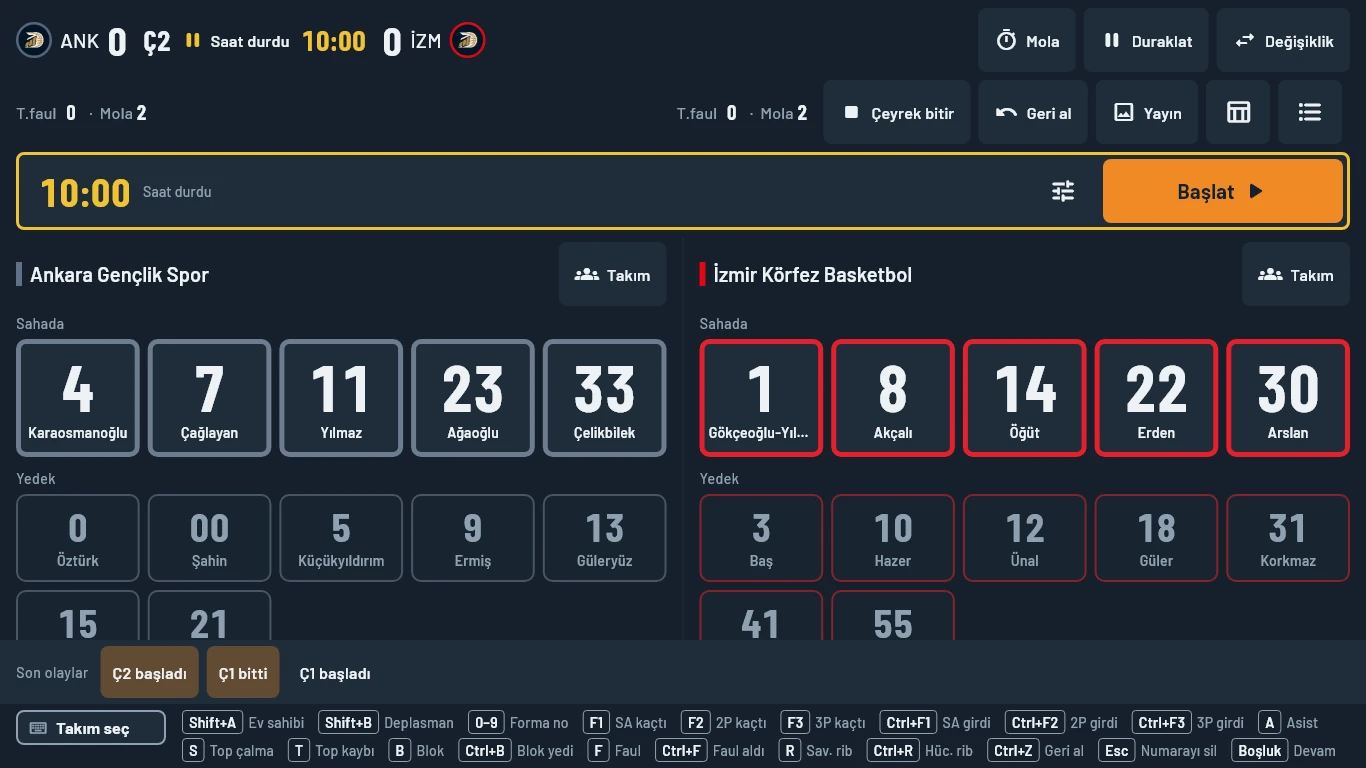
1 · Main device
Computer or tablet. Opens the game, enters one team’s stats and stores the whole record. A phone cannot be the main device.
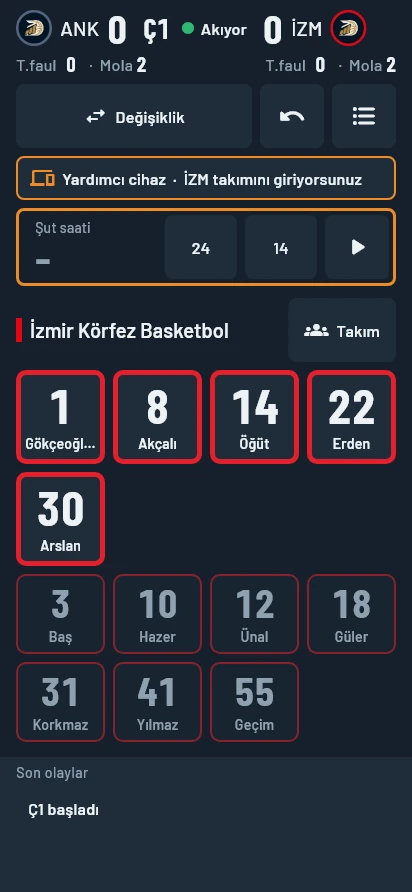
2 · Helper device
Tablet or phone. A second operator enters the other team. Every tap is written to the game on the main device instantly.
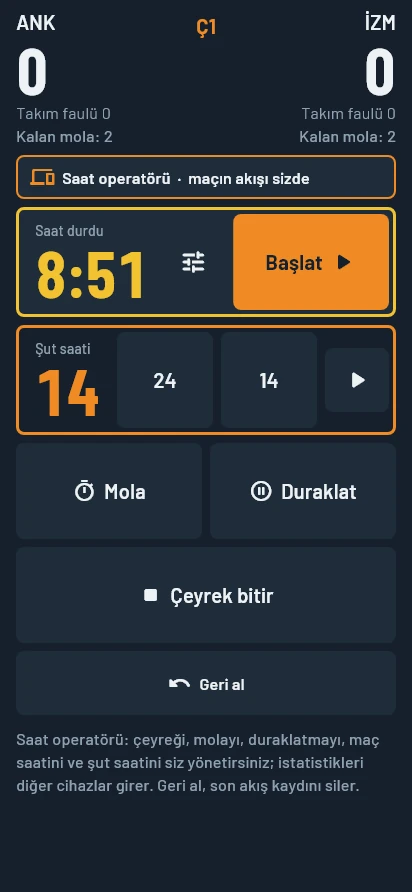
3 · Clock operator
Phone or tablet. Runs the game clock and the shot clock (24 / 14) and calls timeouts, pauses and the end of each quarter. The people entering stats only watch the play.
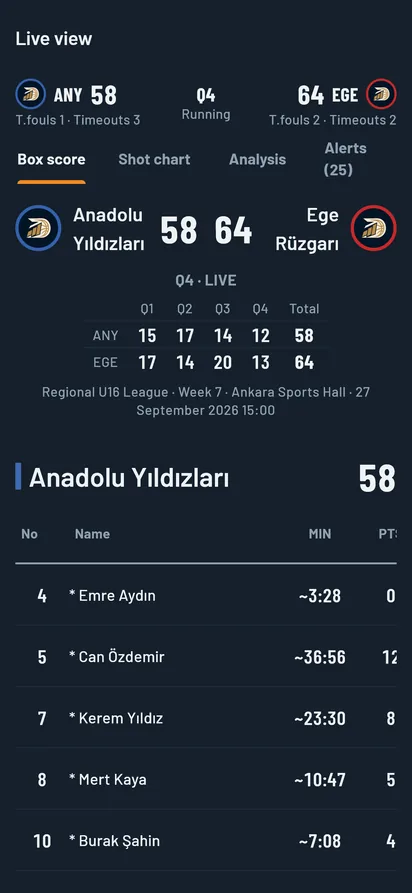
4 · Live view
Phone, tablet or computer. Enters no data; sees the score, box score, shot map, analysis and alerts during the game. No licence needed.
Multi-device entry and Live view are included in the Premium, Organization and Broadcaster plans. The game clock is in every plan and is optional; the shot clock is used in a multi-device setup.
One membership, every device.
- On Windows, too, you sign in with your membership: your e-mail address and password.
- Link your computer licence (Windows / Mac) to your account and enter games on your phone and tablet with the same account. Games are entered on one device at a time.
- Phones have single-team mode; a two-team game is opened on a computer or tablet.
- Game file: move a game to another device as a file (computer ↔ tablet or phone). No internet needed; game data stays on your devices. On a tablet you save the file straight to the device.
Account sign-in, using your licence on a phone, Finishing + / −, the opponent scoring source, the 9-zone shot chart and the game file are in version 1.26: on the App Store, Google Play, the Microsoft Store and in the Windows and macOS downloads on this page.
Live view and smart alerts Premium
The numbers are with you while the game runs.
A coach or manager follows the game live from a separate device. It enters no data and keeps nobody at the table busy.
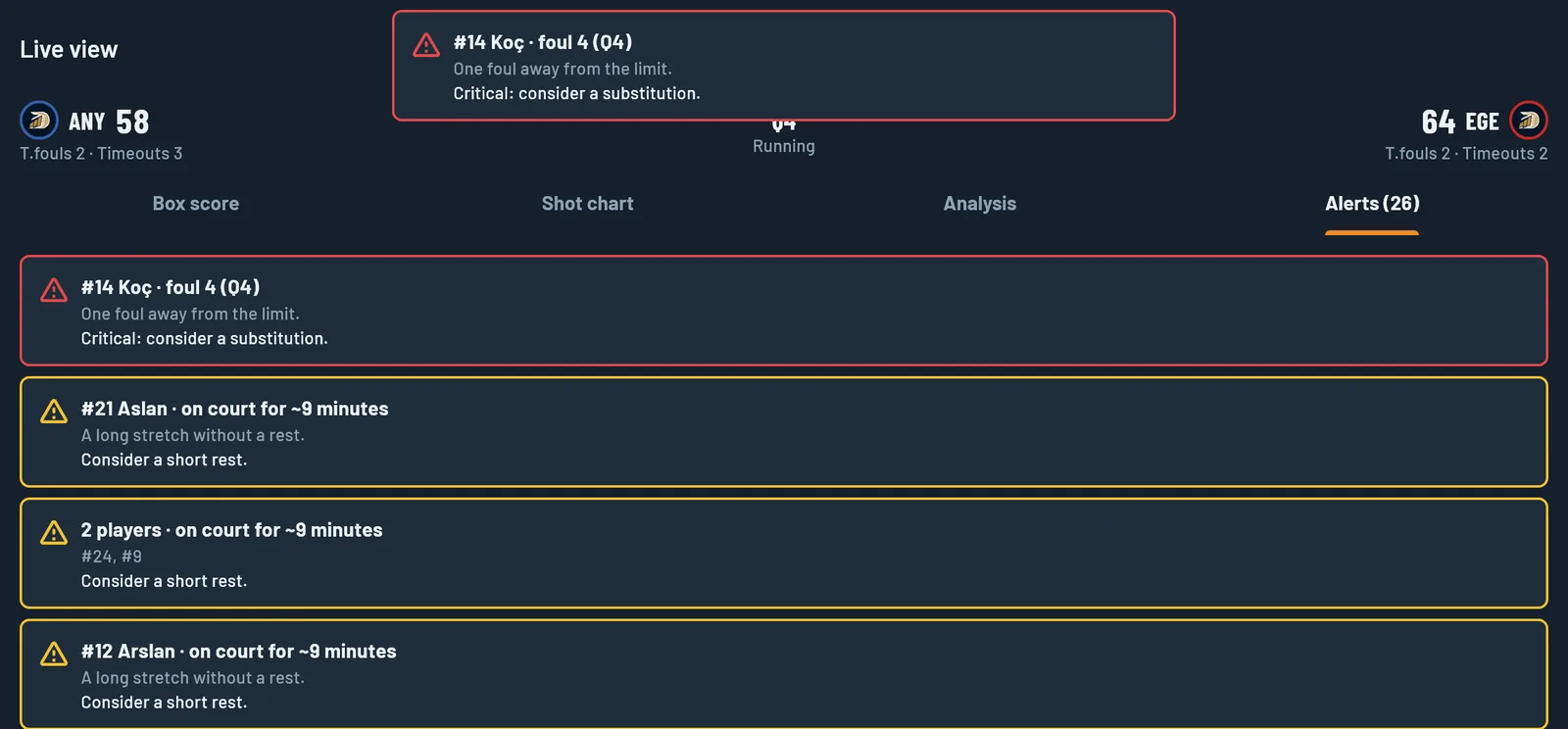
- Live view: box score, shot map, analysis and alerts update with every entry. The score, quarter, team fouls and timeouts left stay at the top.
- Critical alerts appear at once in a red frame: opponent run, foul trouble, opponent foul trouble, team foul limit, scoring drought, a player repeating mistakes, quarter briefing, last-minute timeout.
- Other alerts stay in the list in a yellow frame: opponent bonus, consecutive missed shots, turnover streak, bad passes, cold and hot zones, weak lineup, hot player, rebounding loss, long stretch on court.
- Eighteen alert types in all. Each has a title, a number and a suggestion; the notification names the player and jersey number.
- If no Live view device is connected, the alert appears as a short notification at the top of the main device and does not block your taps.
Some alerts need shot locations, turnover causes or the game clock to be entered. Live view, smart alerts, the quarter and game summary and the nine languages are in version 1.25.0: ready on the App Store, Google Play, the Microsoft Store and in the downloads on this page.
Nine languages
App, reports and graphics in your language.
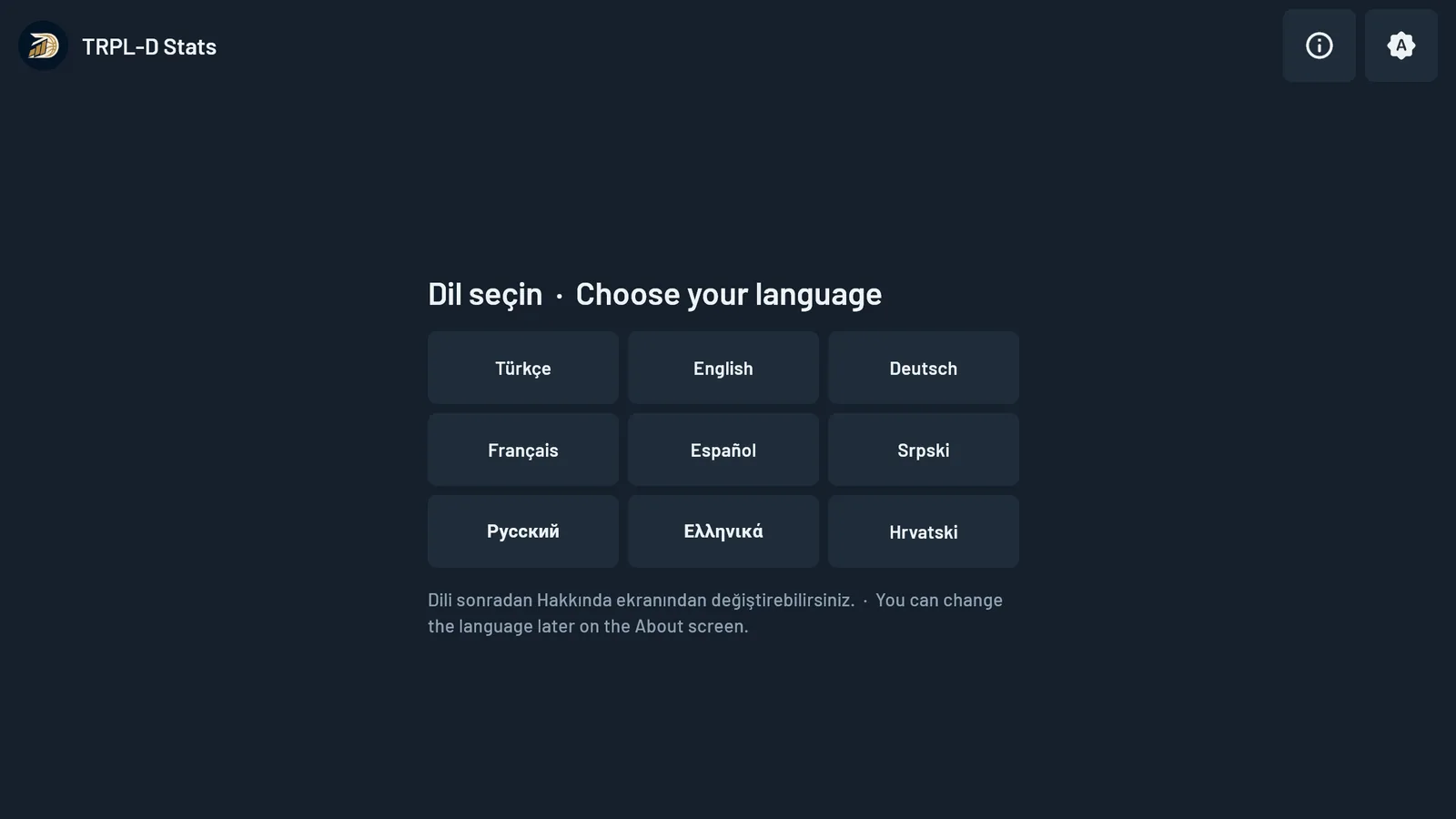
Turkish, English, German, French, Spanish, Serbian, Russian, Greek and Croatian. The interface, reports, PDFs and broadcast graphics come out in the language you choose. You pick it on first launch and can change it later on the About screen.
The user guide and licensing guide are in Turkish and English. Voice entry is in Turkish.
Voice entry BETA
Keep your eyes on the court.
Enter stats by saying them. Press the button and say the sentence: team, jersey number, stat. The record goes into the game while you keep watching the play.
- Push to talk: with the “Speak” button on screen or the button on your headset. The app listens only when you press; it does not mistake crowd noise for a command.
- Team, number, stat: two-pointer, three-pointer, free throw, rebound, assist, steal, turnover, block, foul. For shots you say whether it went in or missed.
- You see what it heard: the sentence heard and whether it was recorded appear on screen. A command it is not sure about is not recorded; a wrong record is removed with “Undo”.
- Audio is not stored: recognition is done by the device’s own speech recognition service; the app does not record audio or send it to us.
Voice entry is in beta. It works on Android tablets, on the main device; commands are in Turkish. A headset microphone is recommended in a noisy gym.
Who it is for
Built for whoever sits at the table.
Coaches and youth programme leads
The game is over; walk into the locker room with numbers.
- Who scored, from where, and how many attempts: in your hand at the final whistle.
- The shot chart is split into 9 zones: tap a zone to see made / attempted, percentage and points. It shows where a player is effective and where they struggle; the marker shape tells where the points came from.
- Follow each player game by game through the season; set targets.
- Hand parents or the board a single player report.
Example: your U16 team played twice at the weekend. Before Monday’s practice you look at each player’s two-game shot chart and turnovers and plan the session around them.
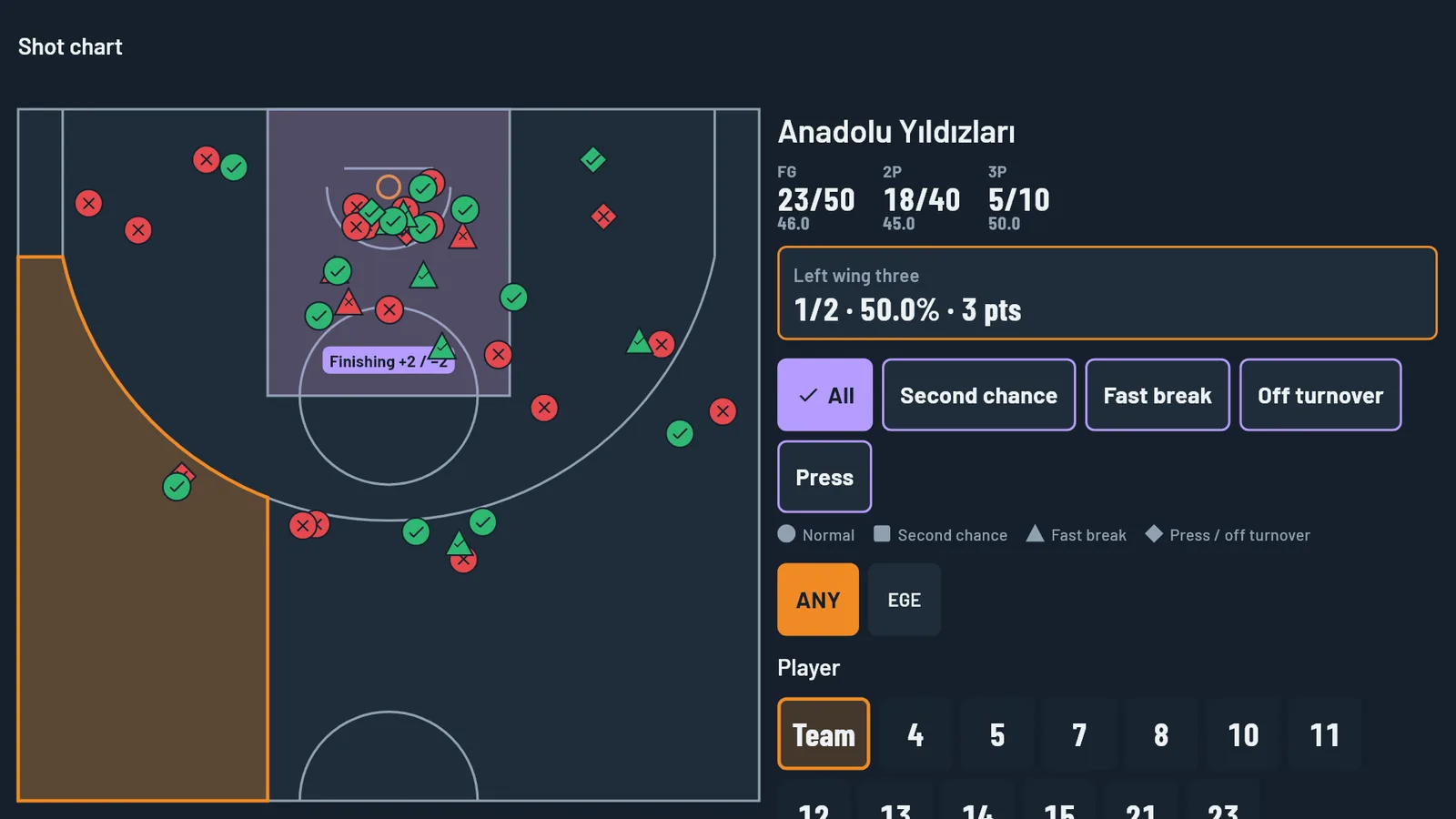
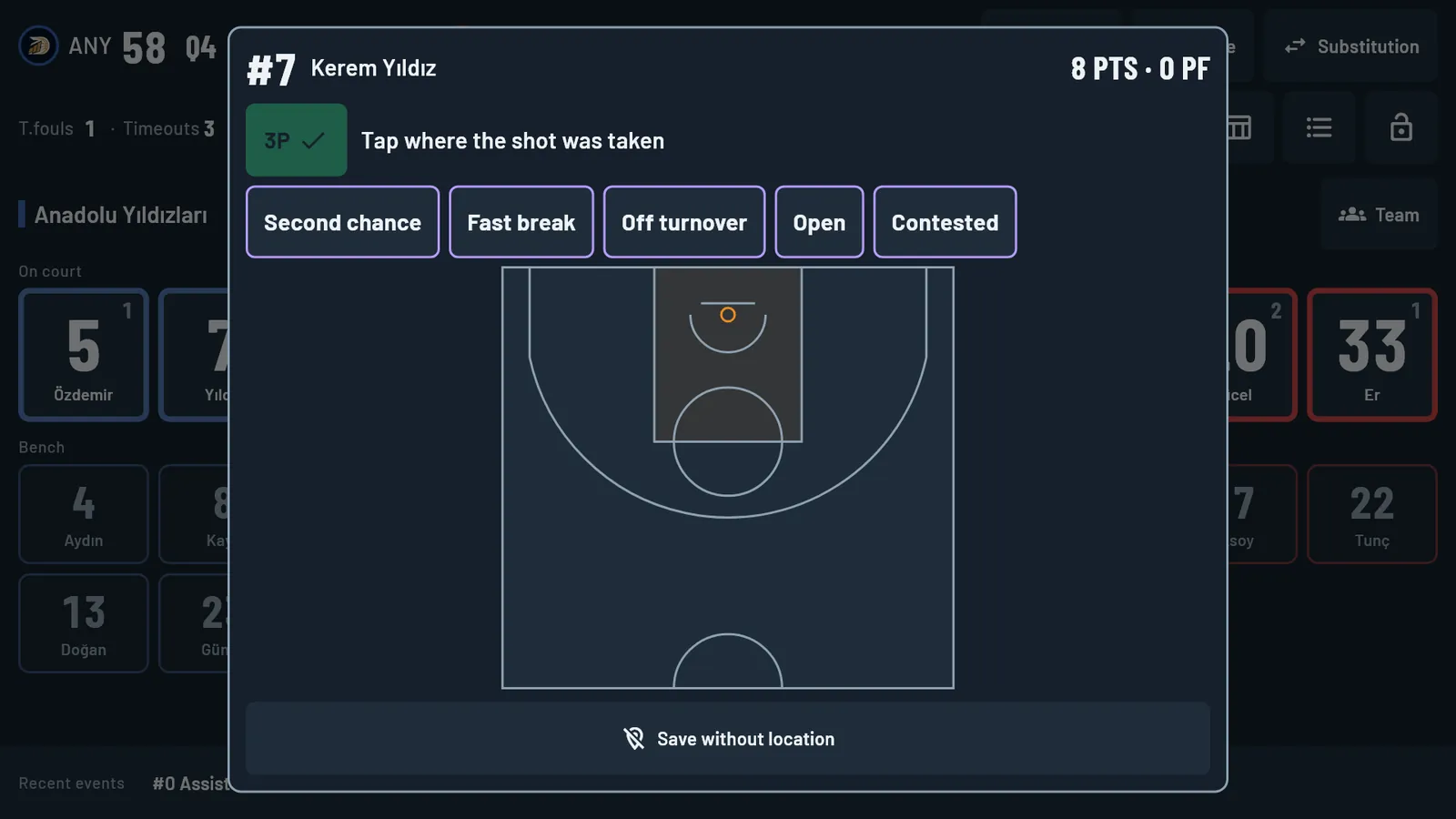
Table officials and statisticians
One person, two teams, no missed plays.
- Large jersey-number buttons; stat buttons always in the same place.
- Enter a steal and the opponent’s turnover is written automatically.
- Quarters, timeouts, pauses, substitutions and overtime on one screen.
- Keyboard shortcuts: choose the team, type the jersey number, press the stat key.
- Shared entry on up to three devices for busy games: two operators each enter one team, a third keeps the clock, and anyone can follow live from a separate device (Premium).
- Single-team mode if you only track your own team.
Example: a rebound, a turnover and a foul come in one possession. Three pairs of taps, a few seconds; your eyes stay on the court.
Federations, leagues and tournaments
The same output from every table.
- All teams and all games in one plan; no team limit.
- The same PDF box score and spreadsheet-ready CSV from every game.
- Import fixtures from a spreadsheet; games arrive ready.
- A weekly licence for weekend tournaments.
Example: a tournament runs in three gyms and every table uses the same app; in the evening you hold box scores in one identical format.
Broadcasters
Stats go in, graphics go on air.
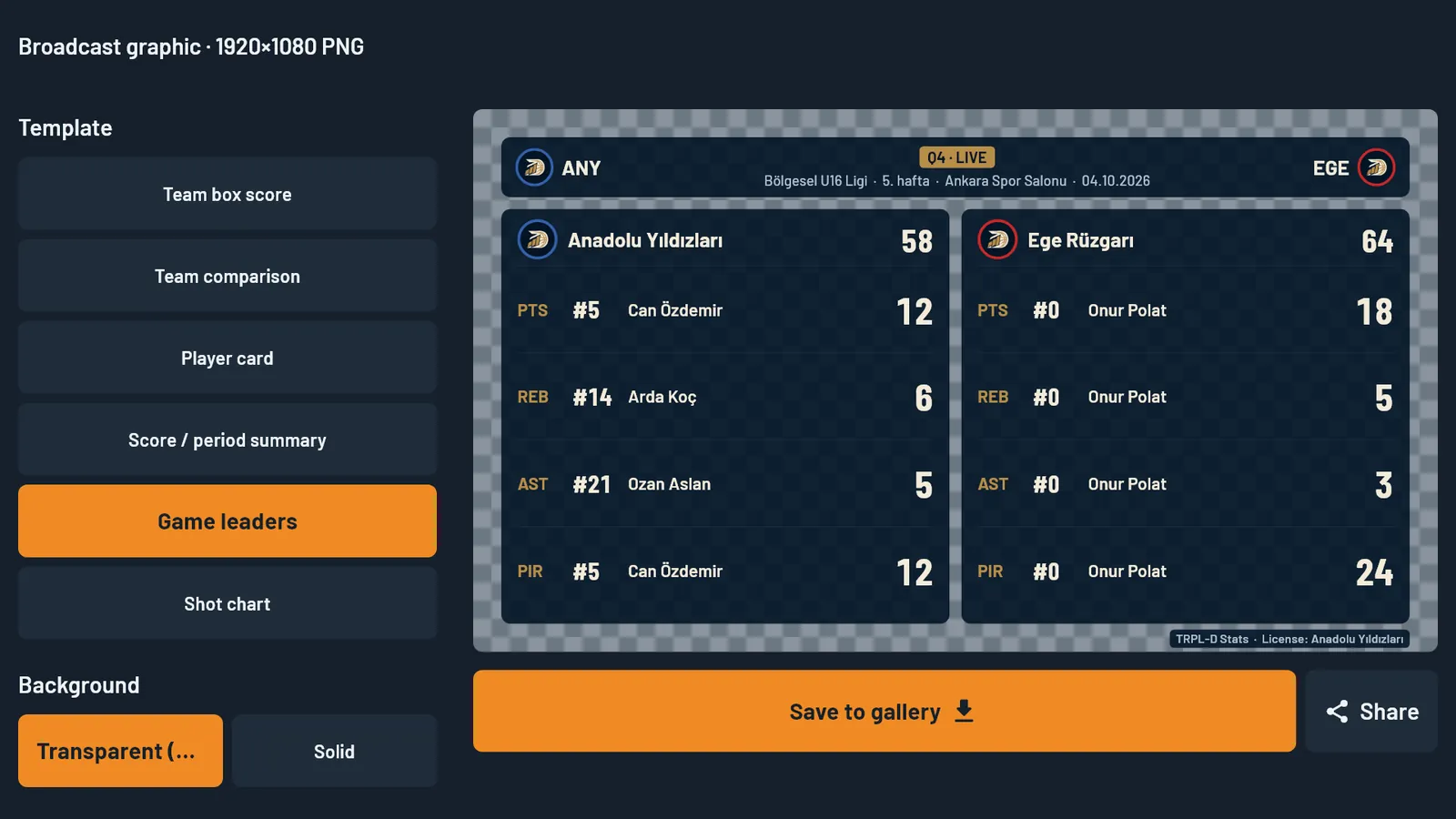
- Six 1920×1080 graphics with transparent background: team box score, team comparison, player card, score summary, game leaders, shot chart.
- Live overlay for OBS: score bug, banners for baskets, fouls and substitutions, and full-screen panels that trigger on their own.
- A layout editor that fits your own lower-third design; a control page for your phone.
- Score timeline export (SRT + CSV) for editing.
Example: a one-person crew: while you enter the stats, the score bug and scoring banners update on air by themselves.
Broadcast images (PNG) are in every plan. The live overlay is part of the Broadcaster plan and runs on Windows only.
Analysis
The box score tells you what happened. Analysis shows you why.
The game analysis center, season report and player reports are part of the Premium tier.
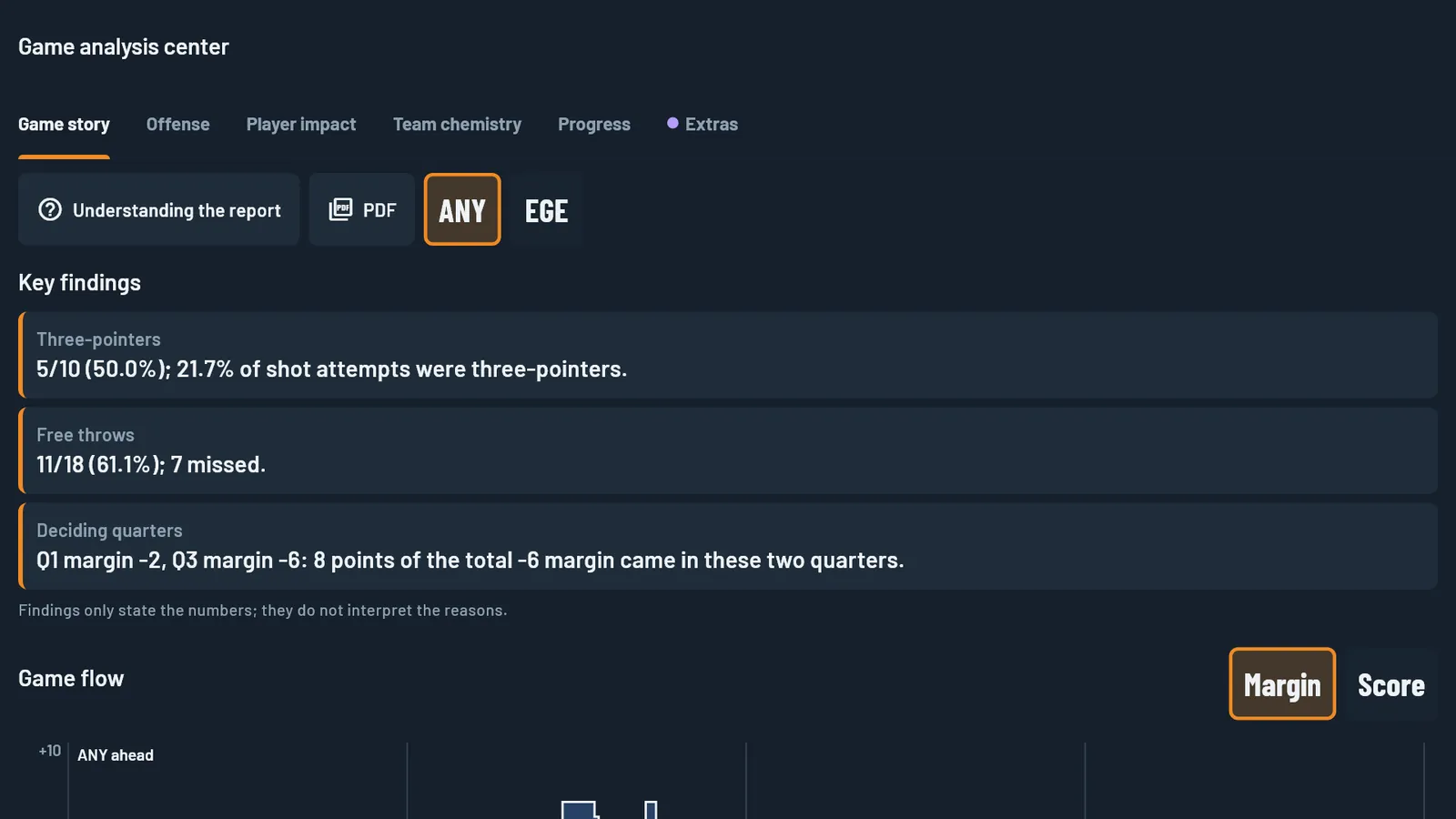
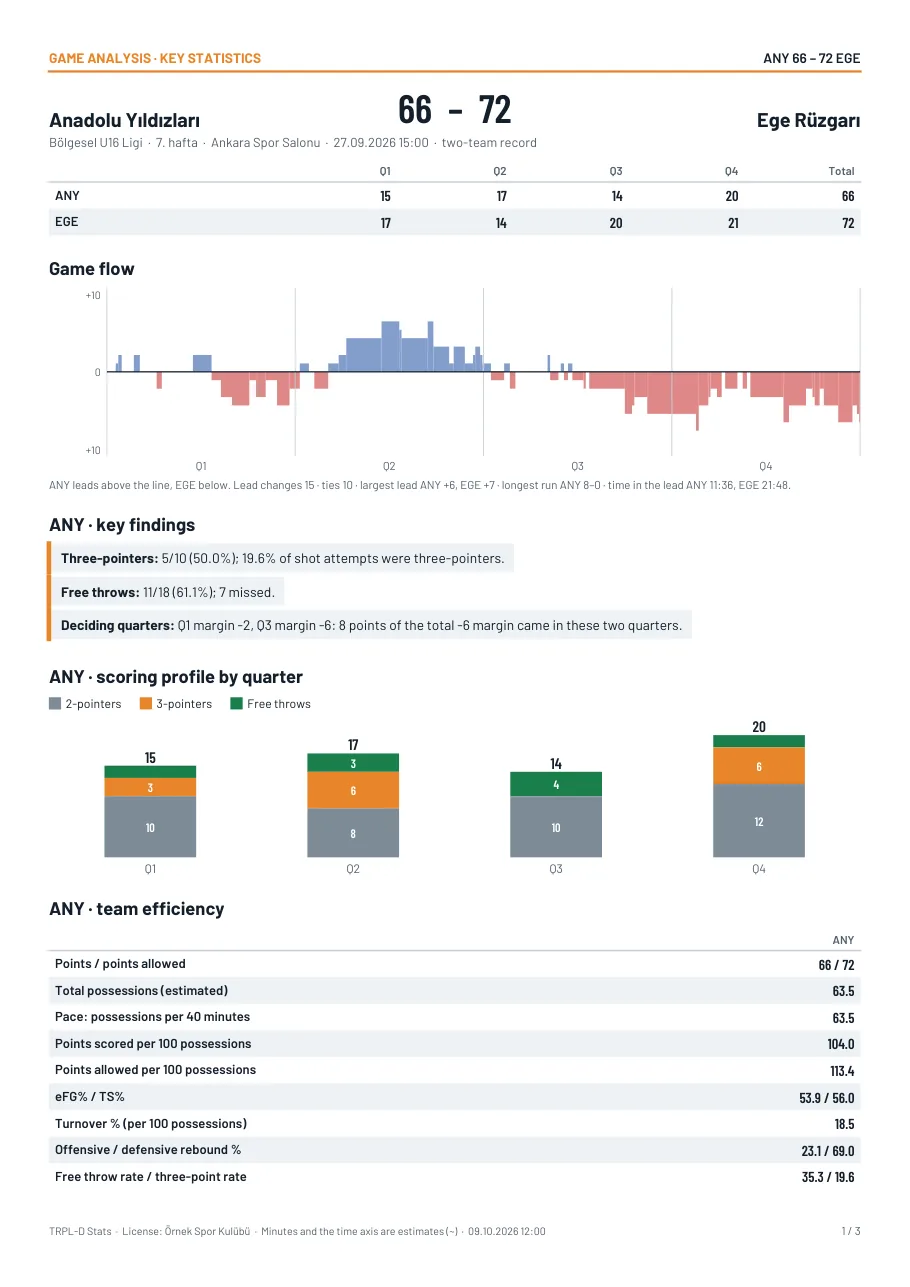
Game story
Shows: how the margin moved through the game, lead changes and the longest run.
Decision: in which minutes you won or lost the game; where the timeout should have come.
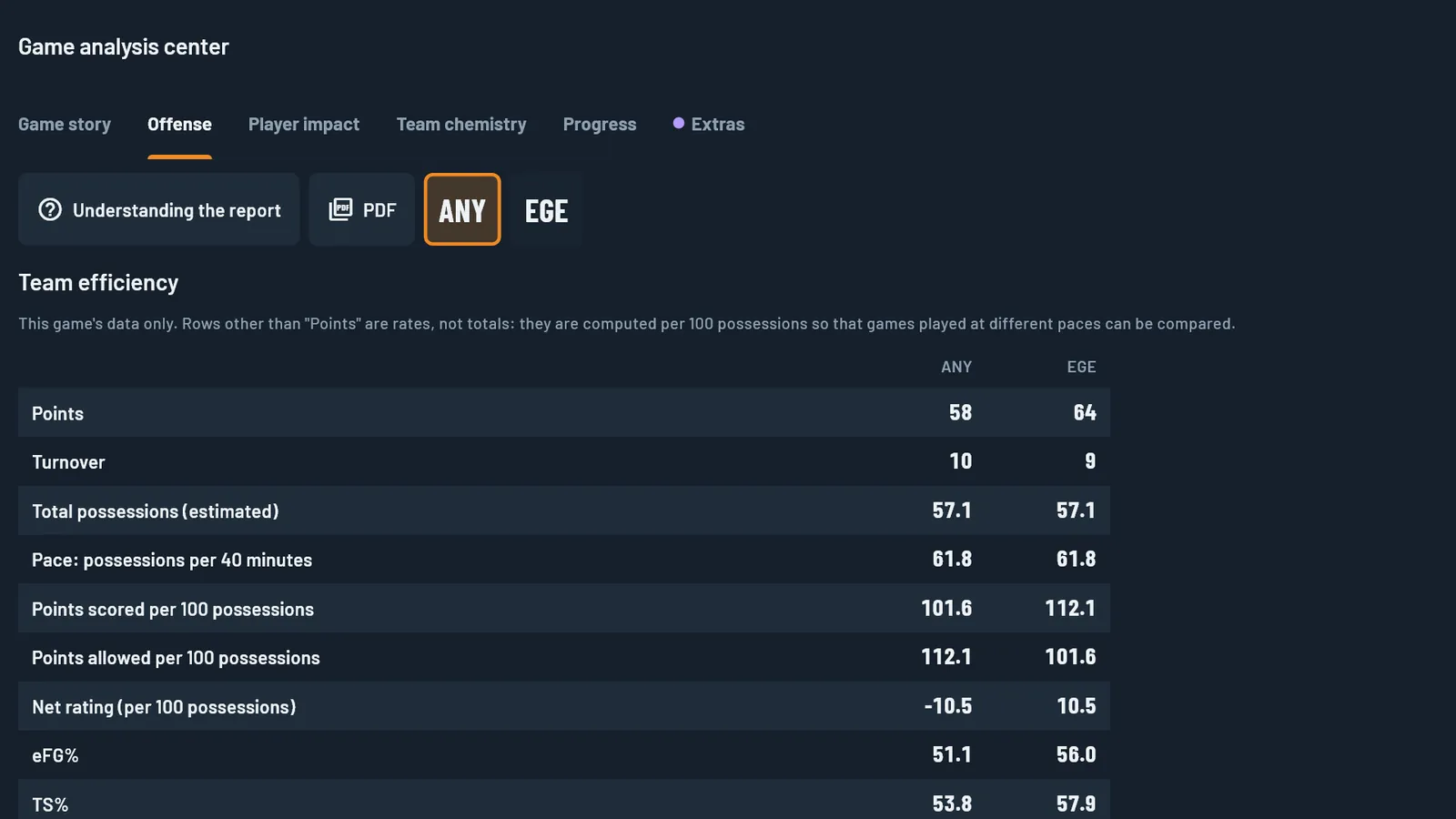
Offence
Shows: scoring by quarter and points per shot by zone.
Decision: which zones to look for and which to avoid.
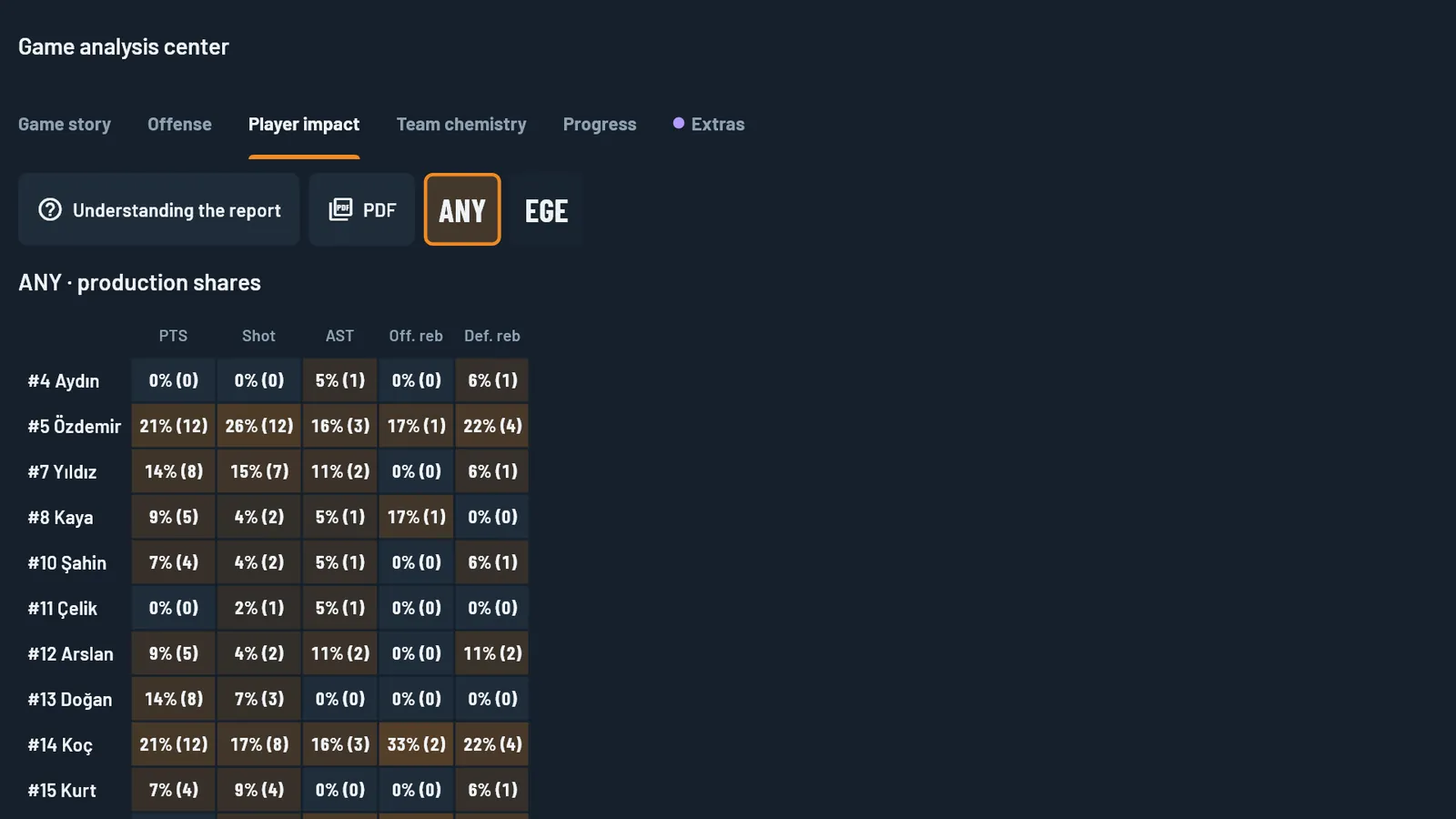
Player impact
Shows: usage next to efficiency; how the team does with a player on the court and on the bench.
Decision: who should have the ball and whose minutes should grow.
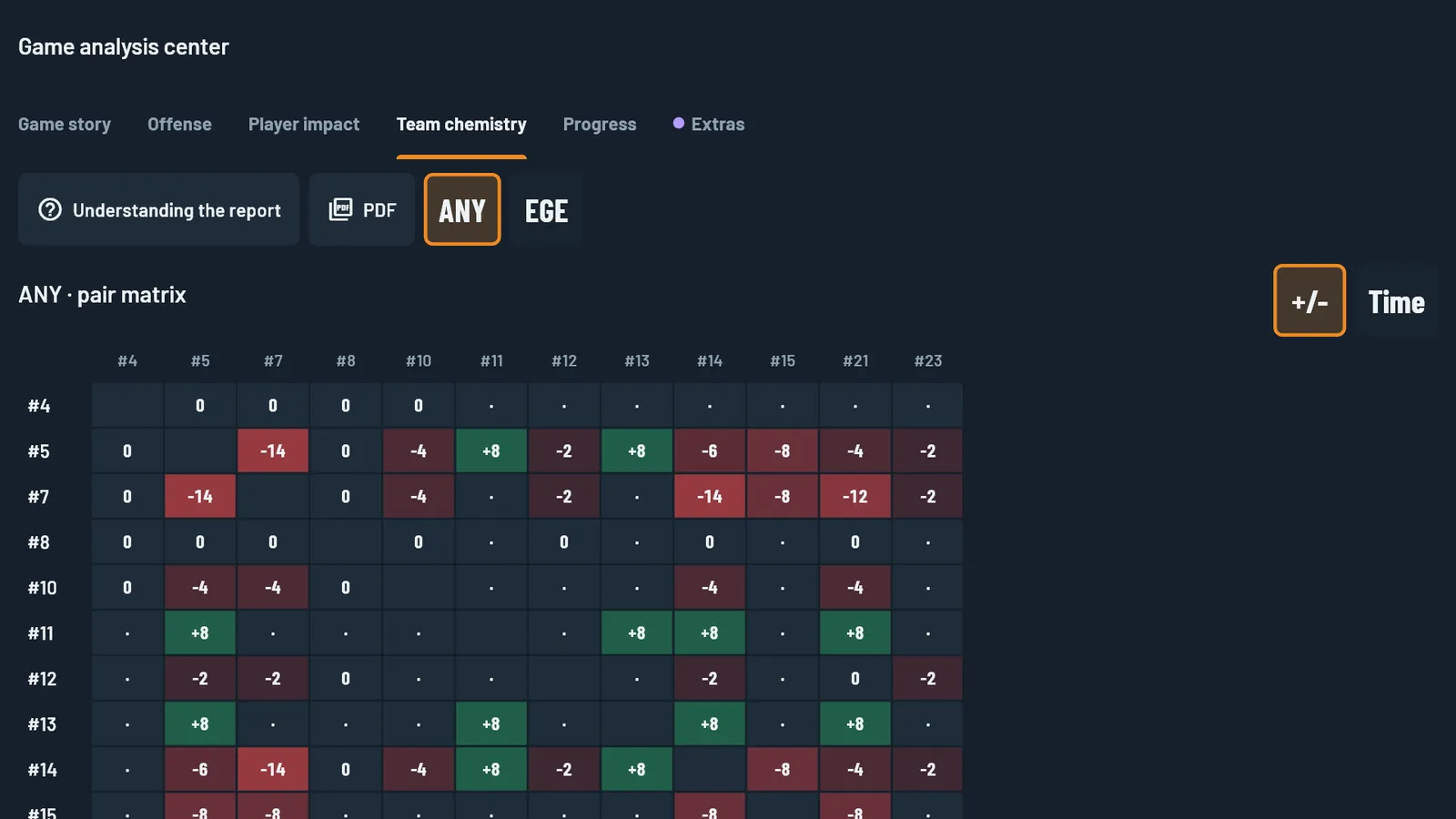
Team chemistry
Shows: the margin each lineup produces, two-player combinations and the rotation chart.
Decision: which five work together and which substitution hurts the team.
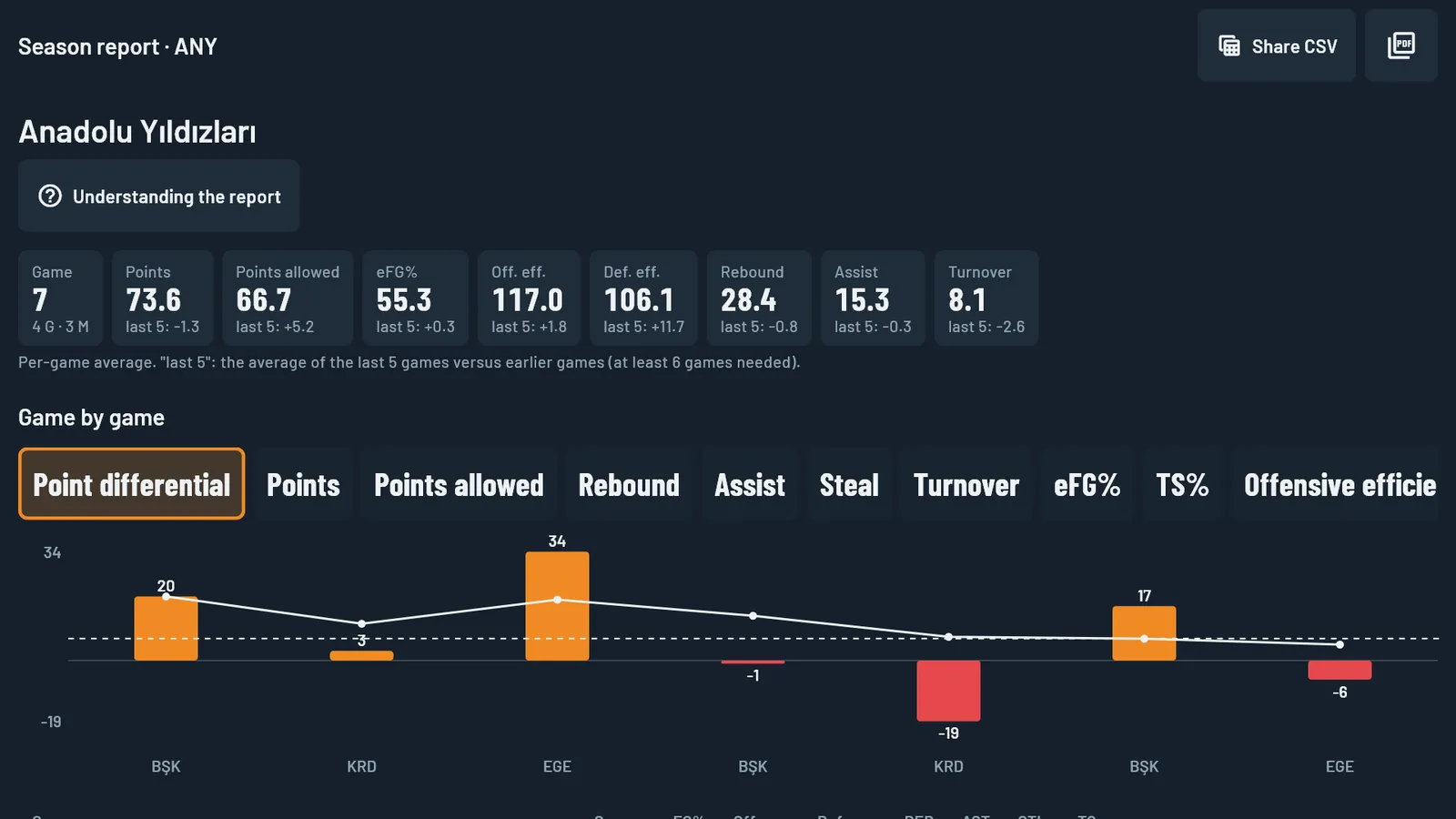
Season report
Shows: team and player values game by game and form over the last five games.
Decision: what has improved during the season and what has slipped.
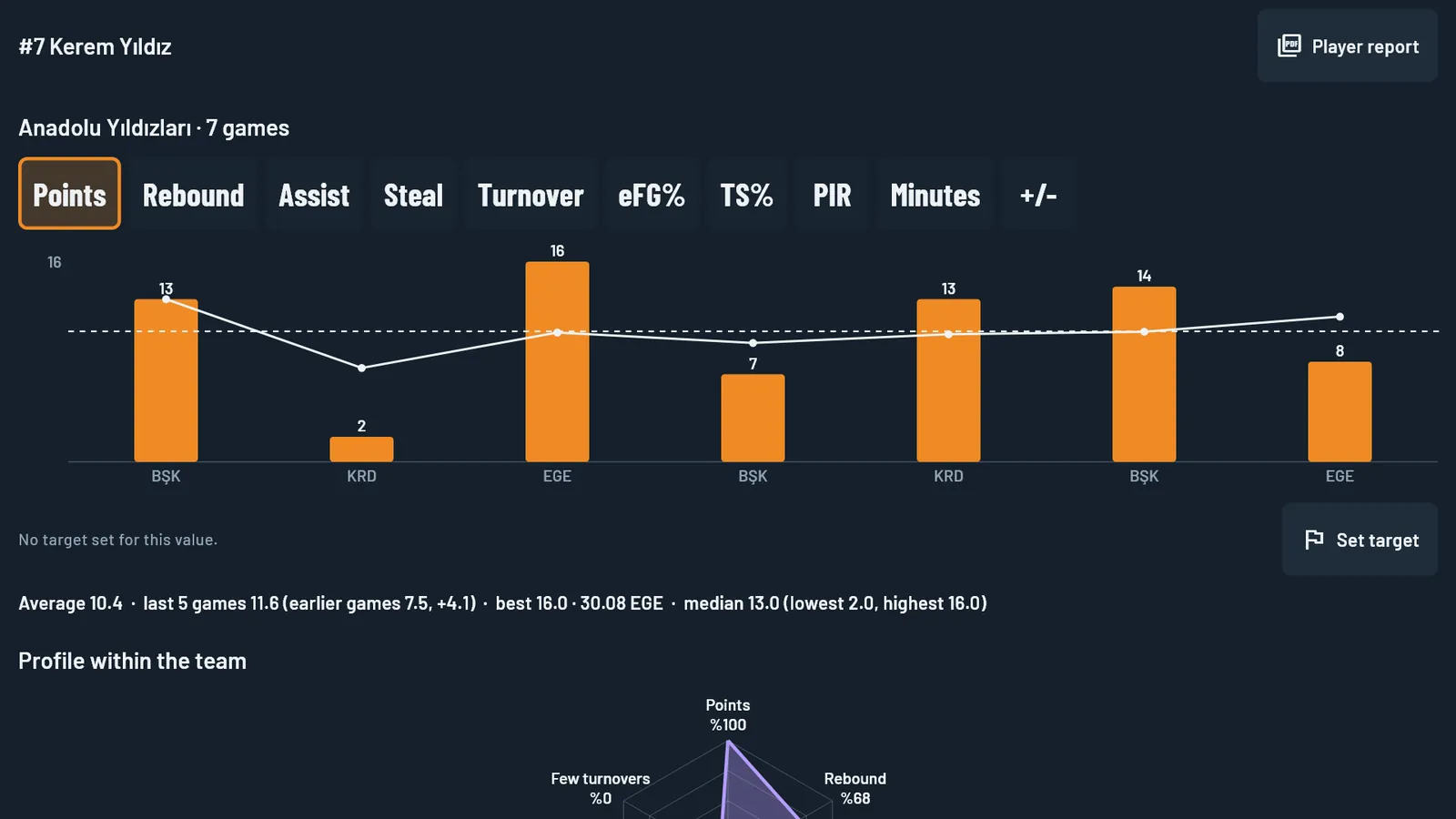
Player progress and targets
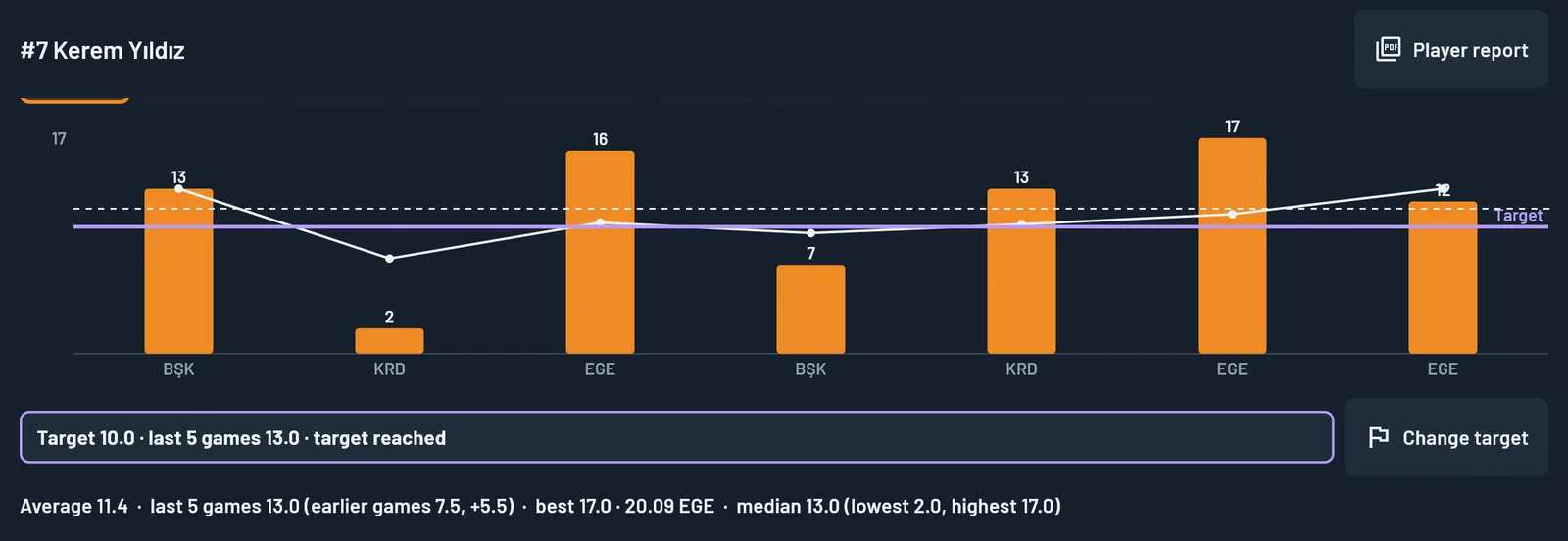
Shows: one player’s game-by-game chart and where they stand against the target you set.
Decision: the individual work plan and what to discuss in the player meeting.
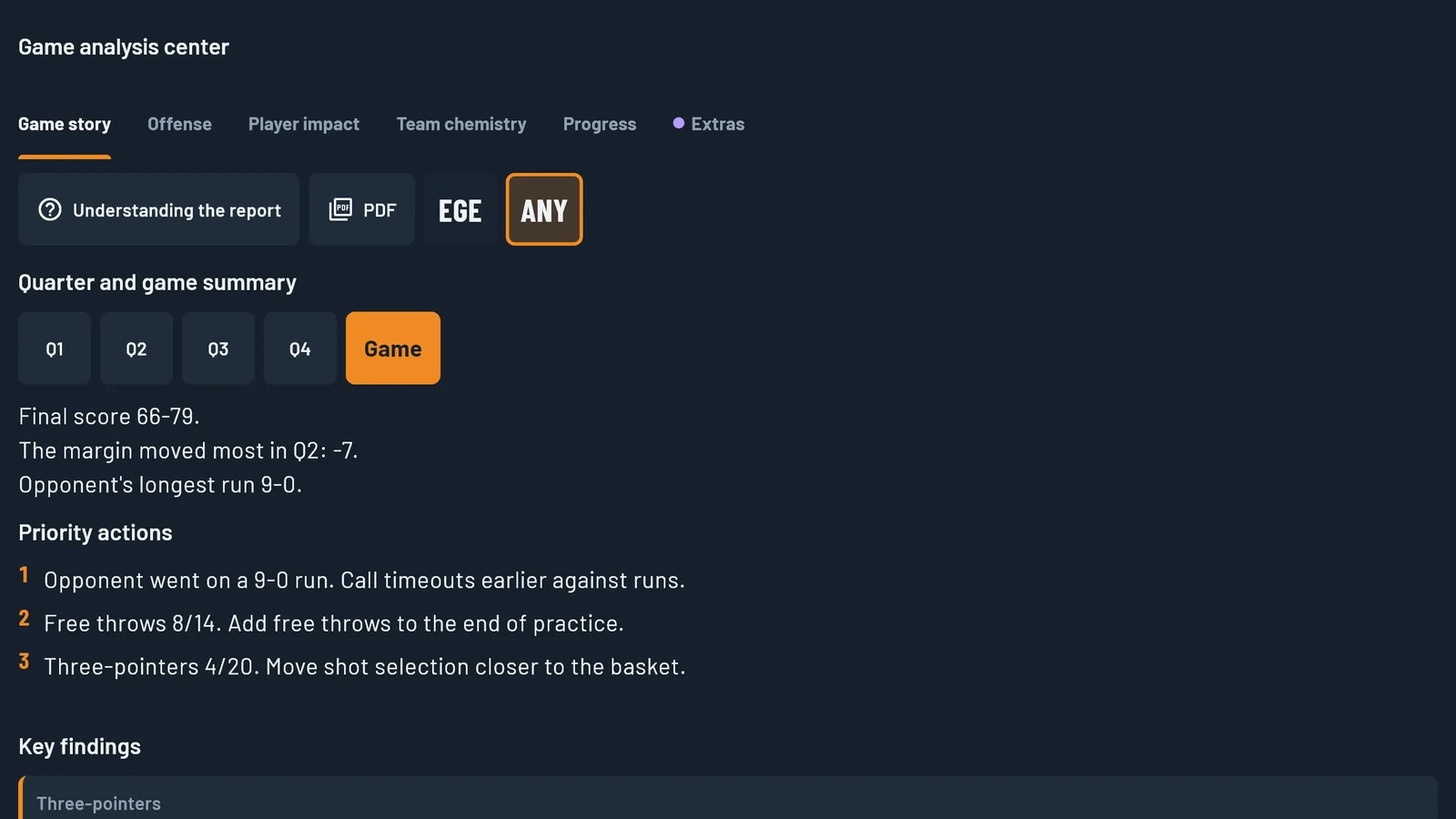
Quarter and game summary
Shows: the score, the quarter margin, the opponent’s longest run and up to three priority actions, each with its number. The game summary is also in the analysis PDF.
Decision: what to say between quarters and what to open Monday’s practice with.
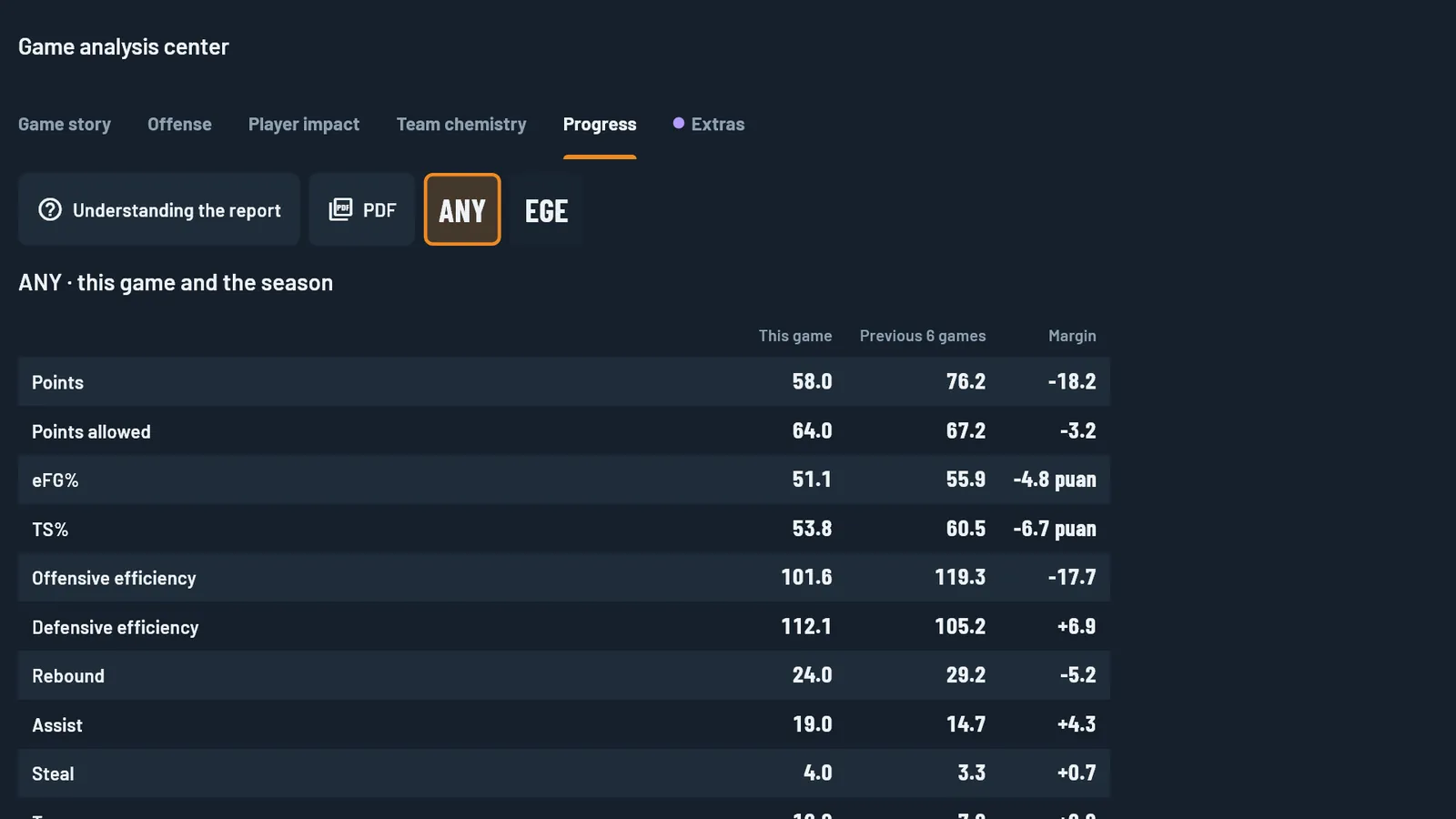
Progress
Shows: this game next to the season.
Decision: whether this game was the team’s norm or the exception.
Sample reports
PDFs produced by the app; team and player names in them are made up.
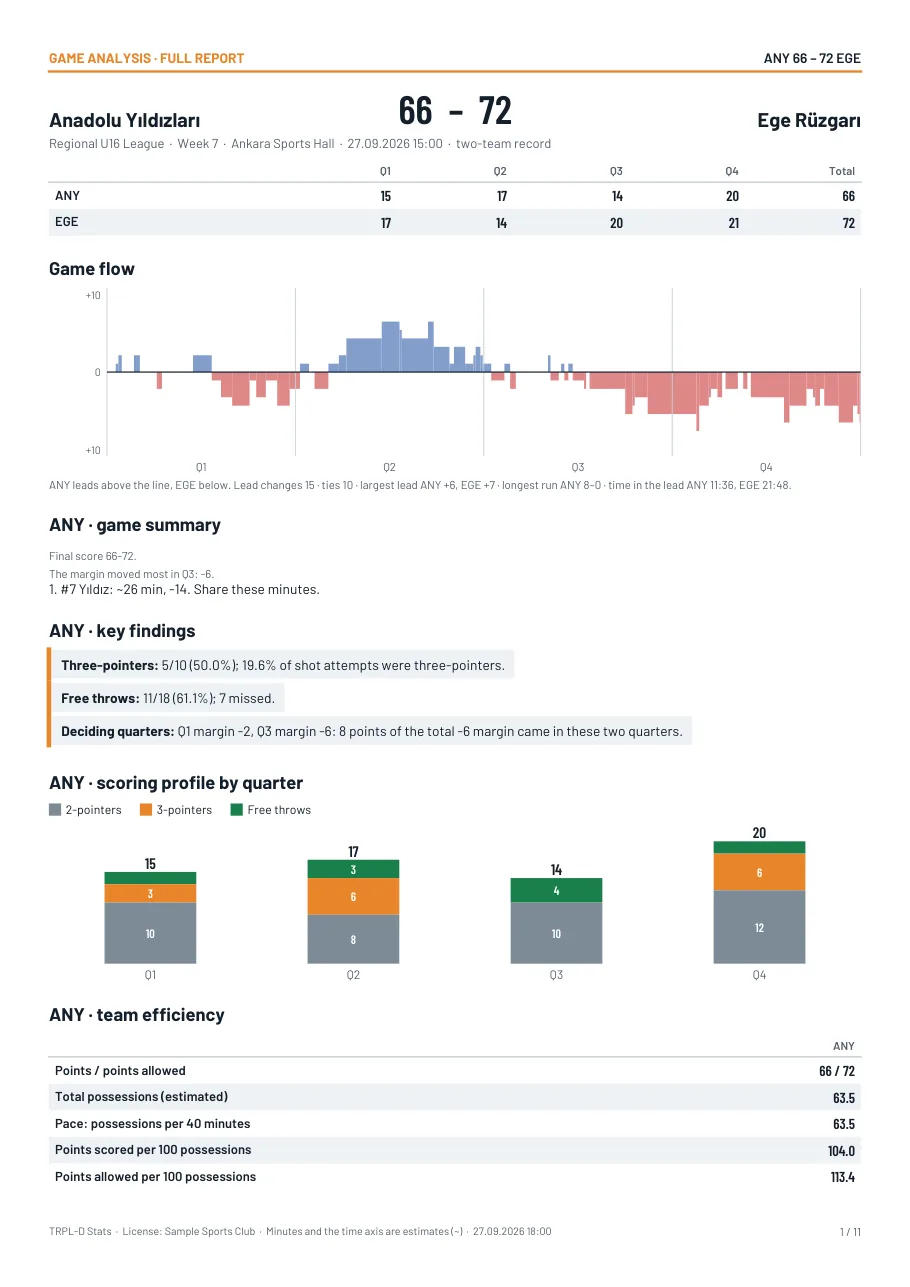
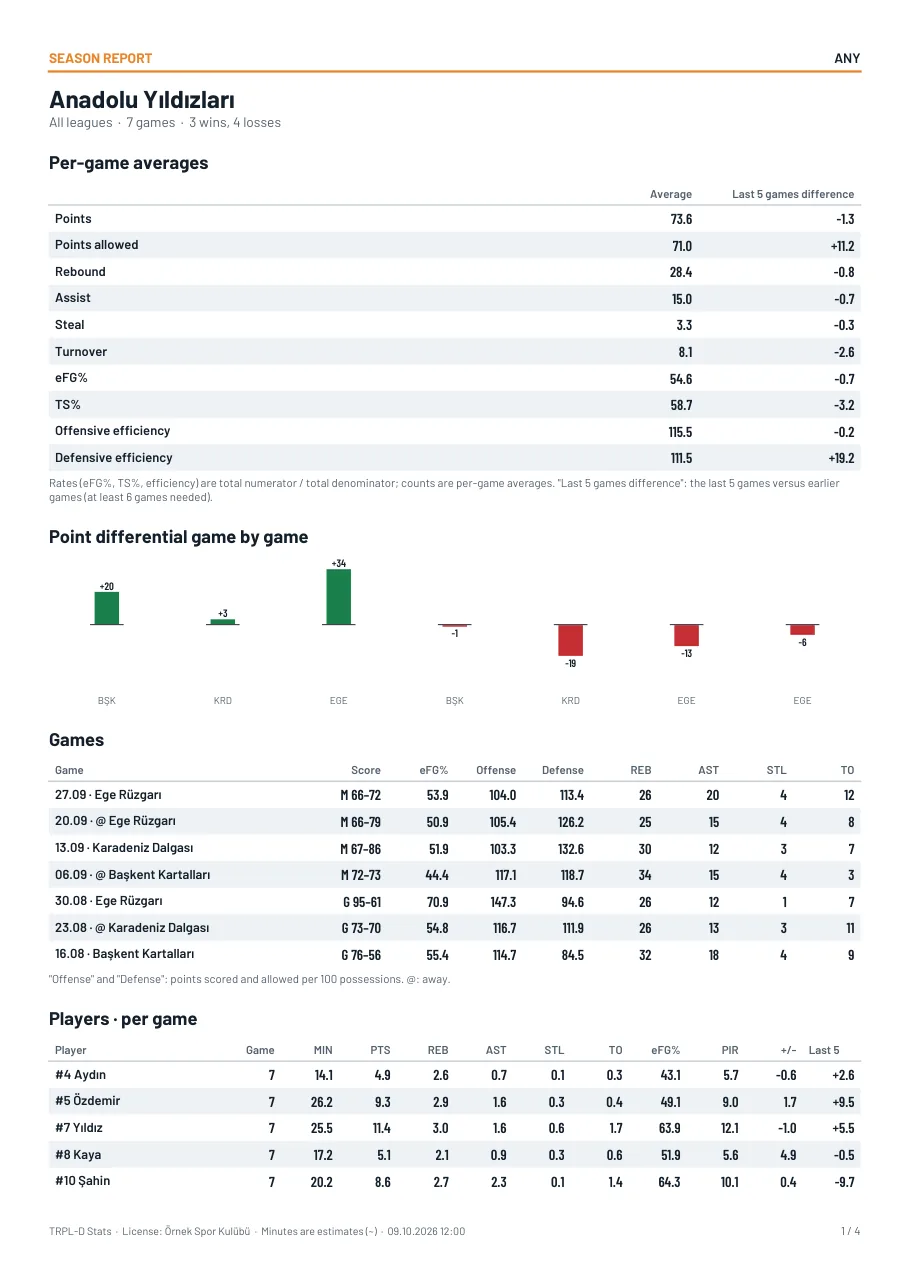
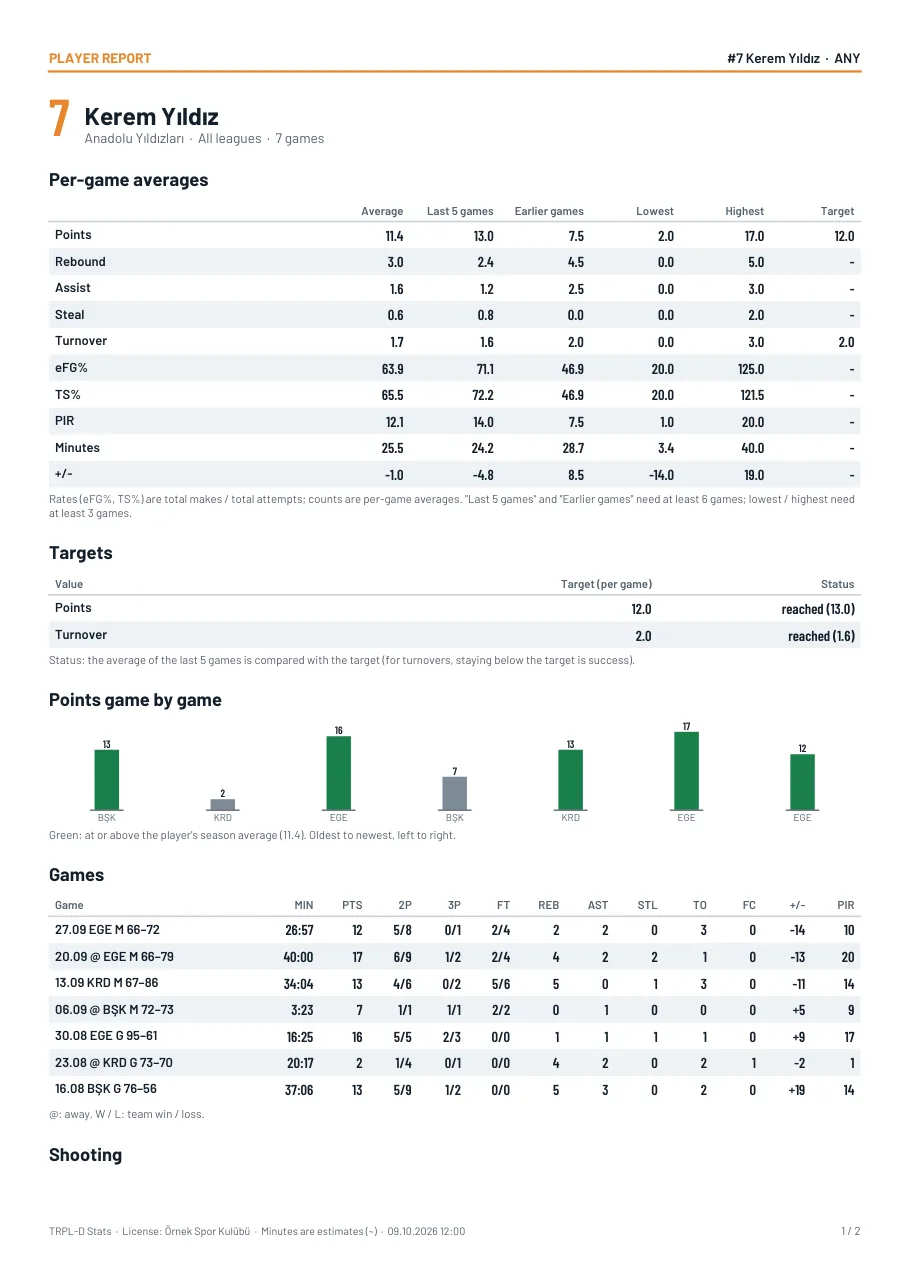
The game clock is optional. If you use it, minutes played come from the clock; if you do not, minutes played and time-based charts are estimates and are marked with “~” on screen. Counting stats and plus-minus are always exact.
Extra statistics Premium
How did the points come, how was the shot taken?
The box score tells you how many points were scored. Extra tags show where those points came from. All of them are optional; skip them and the entry is still complete.
Scoring source
How did the points come?
Second chance, fast break, off turnover. Untagged shots gather in the “Set offense / untagged” row.
Shot pressure
How was the shot taken?
Open or contested. You mark it with the purple button on the court screen when entering a shot.
Turnover cause
Why was the ball lost?
Bad pass, dribble, travel, offensive foul, time violation, out of bounds. When you tap “Turnover” the player card stays open; you pick the cause with one tap.
Finishing
Finishes at the rim
Finishing + or − on the player card: every finish close to the basket. Tap it, the court opens and you mark where the shot was taken. Analysis keeps Finishing and second chance in separate sections, in game, season and player reports and PDFs.
Opponent scoring source
Where did their points come from?
In single-team mode, each opponent basket can get an optional source: second chance, fast break, press, steal, regular offense. A one-point free throw is recorded without asking for a source. It appears as a table in game and season analysis.
Finishing + / −, the opponent scoring source and shot zones are entered in every plan. Their analysis, the scoring source and shot pressure tags and the turnover cause are Premium.
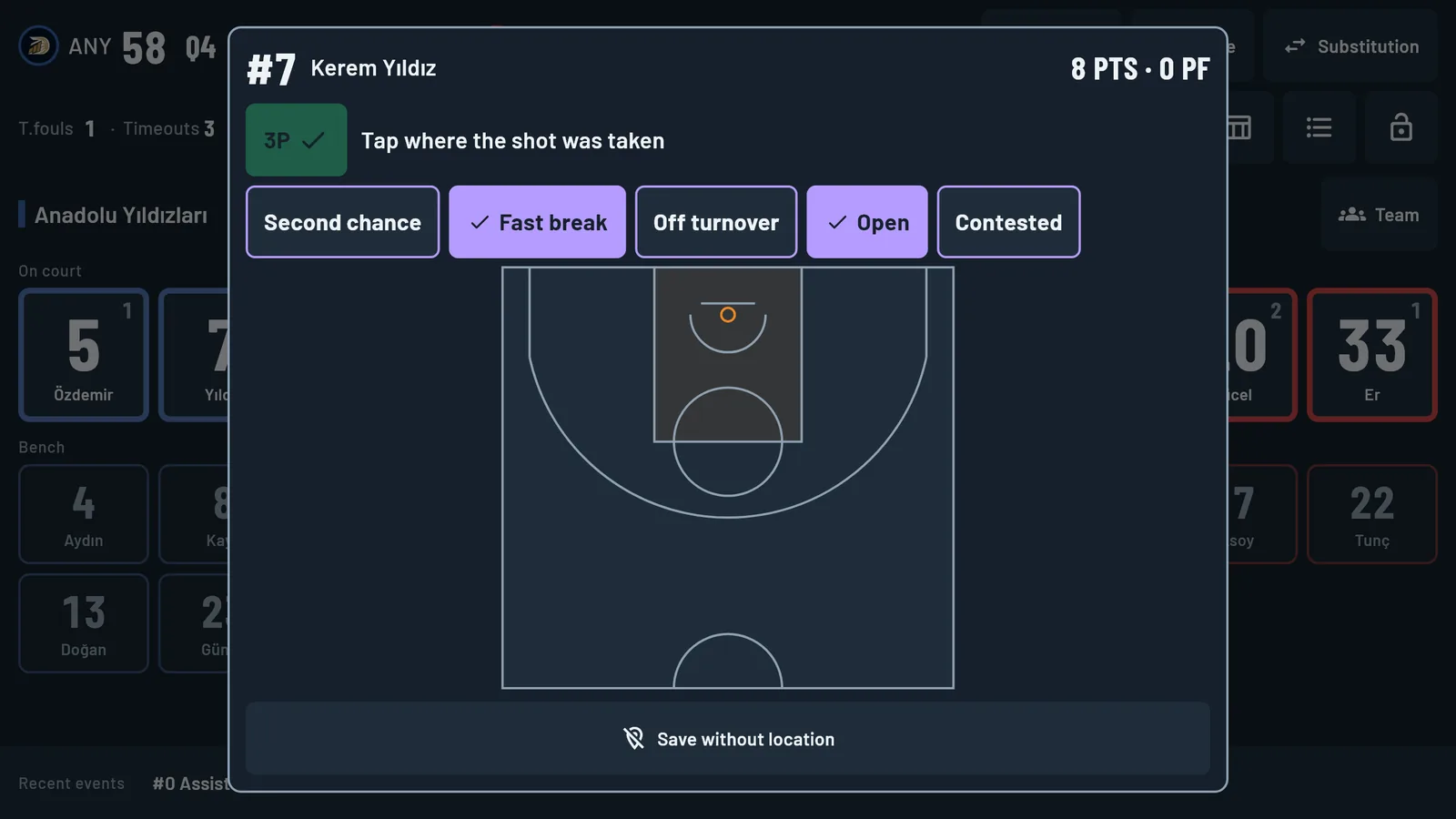
Purple tag buttons on the court screen when entering a shot
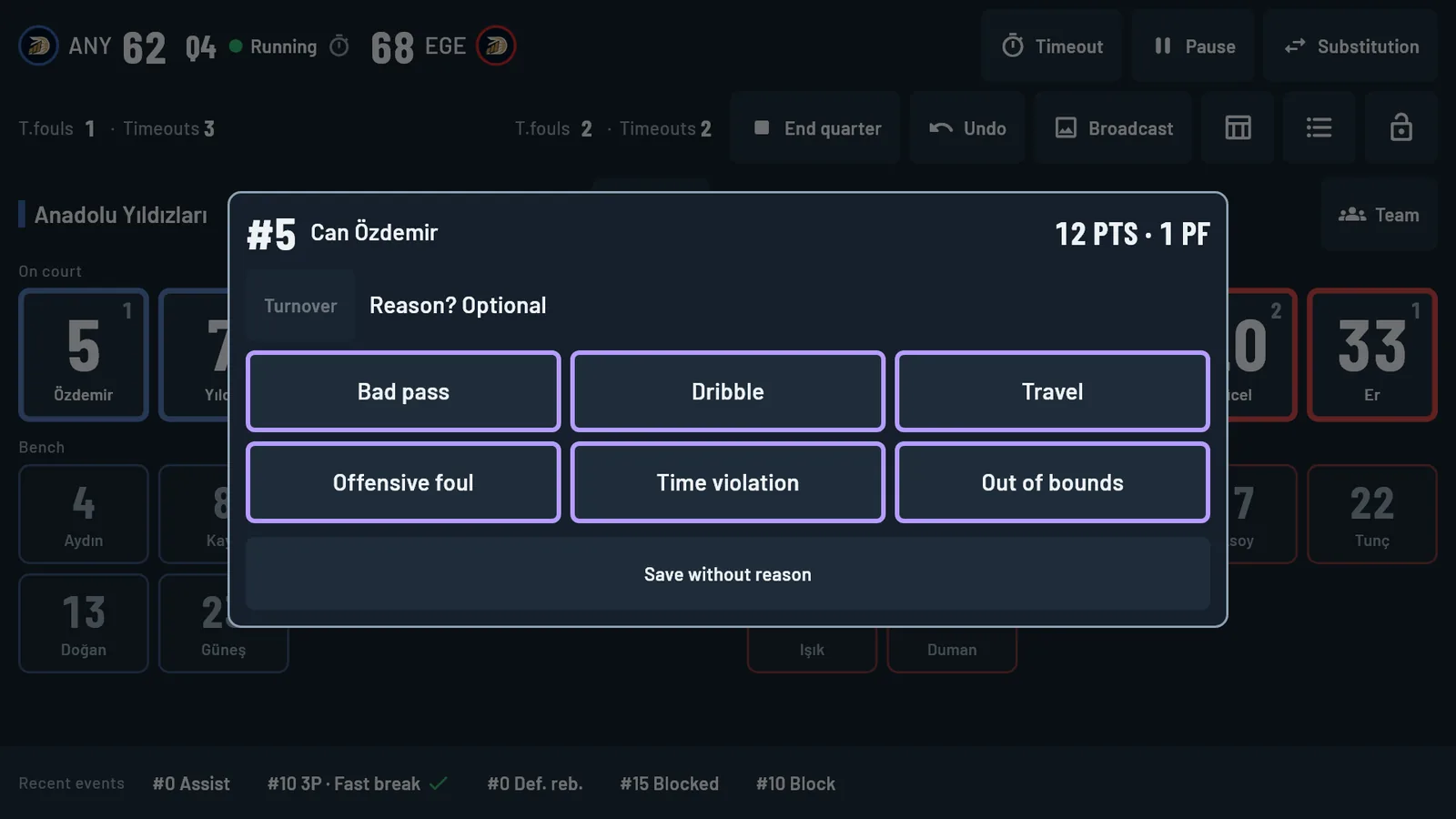
Turnover cause buttons on the player card
What is on the Extras tab?
- Finishing: made / attempted and percentage on finishes close to the basket, player by player.
- Second chance: second-chance points and the “offensive rebound → points” rate.
- Opponent points by source: points, share and count.
- By scoring source: made/attempted, percentage, eFG%, points and points per shot.
- Open and contested shots: made/attempted, percentage and eFG%.
- Turnover causes: player by player.
- It shows how many records are tagged; an untagged record does not count as zero. A forgotten tag can be added later from the event’s correction card.
- The same figures are in the full analysis PDF.
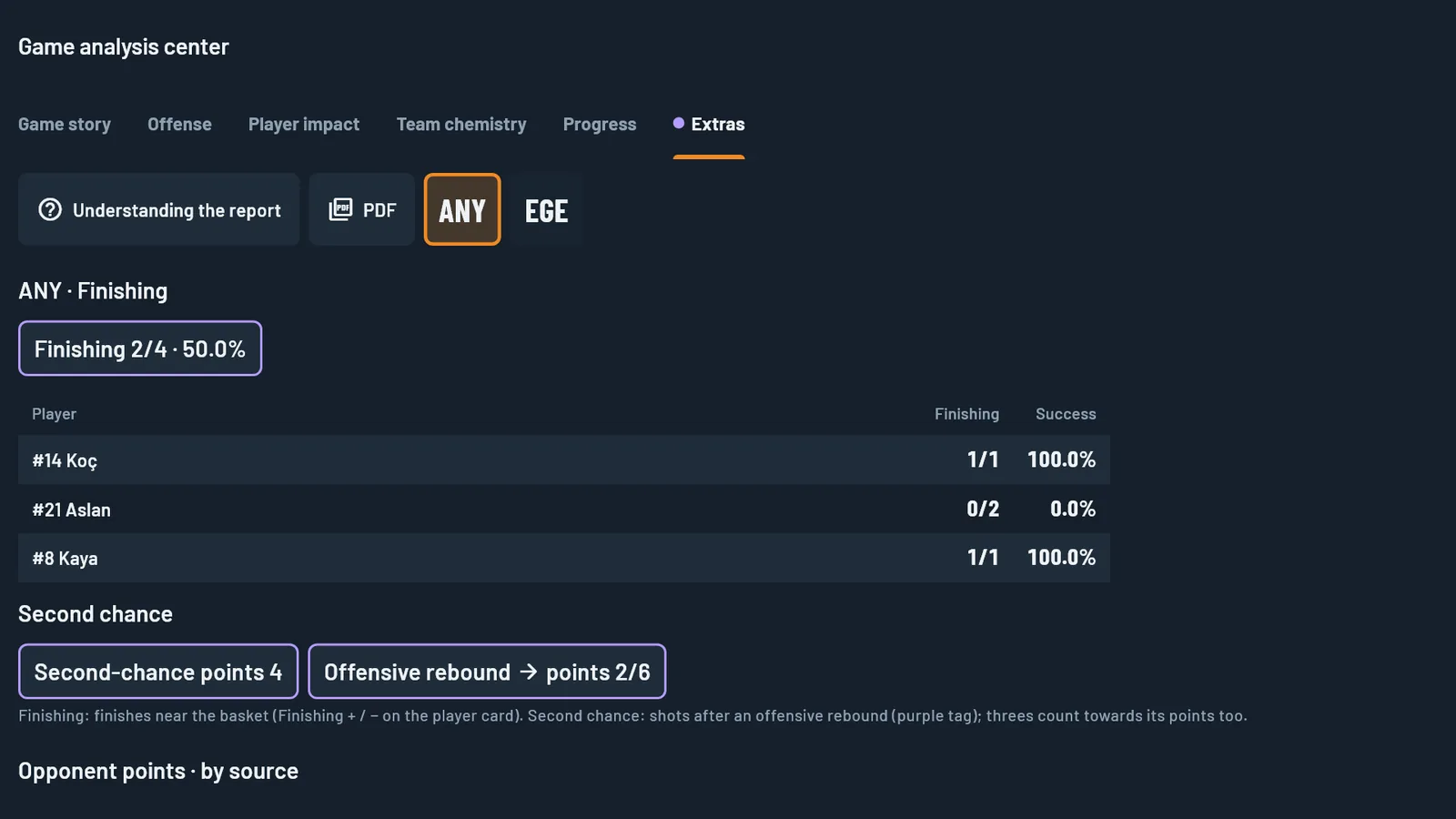
Teams, players and figures in these images are examples.
Game analysis center: six tabs
All the analysis is here; you can also take it as a short or a full PDF.
Game story
Quarter and game summary, priority actions, key findings, game flow chart, lead changes, ties, largest margin, longest run, quarter offense profile, quarter-by-quarter table.
Offense
Team efficiency, shot value by 9 zones (paint; mid-range left, centre, right; corner three left, right; wing three left, right; top of the key three), usage and efficiency, production shares.
Player impact
Player table (including per-36-minute values), PIR components, each player’s game story, on and off court.
Team chemistry
Pair matrix, lineups and offensive character, rotation map, before and after substitutions, assist connections.
Progress
This game against the season.
Extras
Scoring source, shot pressure and turnover causes.
Metrics: eFG%, TS%, total possessions, pace, offensive and defensive rating (points scored and allowed per 100 possessions), net rating, assist/turnover, free throw rate, three-point rate, turnover percentage, offensive and defensive rebound percentage, usage, PIR, +/-.
Player targets Premium
A per-game target for every player.
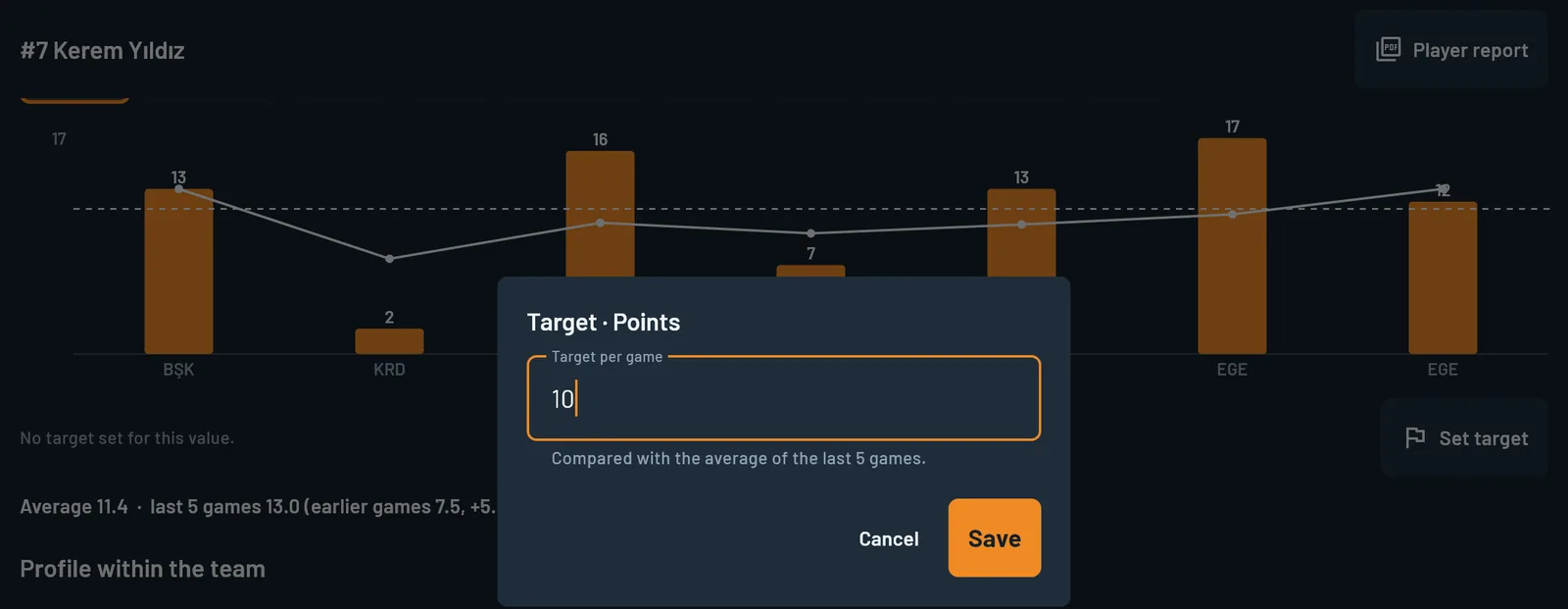
Set a target for points, rebounds, assists, steals, turnovers, eFG%, TS%, PIR, minutes or +/- and follow it game by game through the season.
- On the player progress screen you tap “Set target”; you can change or remove it later.
- A purple target line appears on the game-by-game chart with the status below it: “Target 10.0 · last 5 games 13.0 · target reached”.
- At least 3 games are needed for a verdict. For turnovers, staying below the target counts as success.
- The player report (PDF) has a target column next to the averages and a separate Targets table.
Trust
Your game data stays on your device.
Works offline
You need no connection to enter a game; it works even if the gym has no Wi-Fi.
Your game data never reaches us
Teams, player names, games and statistics are stored only on your device. They leave it only when you export or share them.
We keep licence details only
For your licence: your e-mail address, club name, licensed team categories and device ID. No games, players or statistics.
No ads, no analytics
The app contains no advertising and no analytics; we do not sell data.
The local network is yours to switch on
Shared entry, Live view and the OBS overlay work only when you turn them on, between devices on the same network.
One-file backup
Save all your data to a single file and move it to another device.
Details: Privacy policy · Account deletion
Plans and prices
Buy only what you need.
On club plans, paying yearly saves you about 5 months of fees compared with paying monthly.
Club plans
| Plan | Yearly | Monthly |
|---|---|---|
| Standard · 1 team | $100 | $15 |
| Standard · 3 teams | $230 | $33 |
| Standard · 7 teams | $420 | $60 |
| Standard · Unlimited | $600 | $85 |
| Premium · 1 team | $150 | $22 |
| Premium · 3 teams Recommended For clubs working with three age groups; analysis and two-device entry included. | $350 | $50 |
| Premium · 7 teams | $650 | $95 |
| Premium · Unlimited | $900 | $130 |
Other plans
| Plan | Yearly | Monthly |
|---|---|---|
| Organization · per scorer’s table Federations, leagues, tournaments. All teams, all features. Tournament: $60 per week. | $2,675 | $320 |
| Broadcaster · per computer All teams, all features and the OBS live overlay. Windows only. | $2,675 | $320 |
| Demo 3 days, all features; once per device. | Free | — |
Prices are in US dollars and exclude VAT. Each team you add later costs an extra $10 per month or $90 per year. The current price is on the purchase page; if the two pages differ, the price in the store applies.
Standard vs Premium
| Feature | Standard | Premium |
|---|---|---|
| Game entry, undo, event correction | Yes | Yes |
| Box score; PDF and CSV export | Yes | Yes |
| Shot location and shot chart (9 zones) | Yes | Yes |
| Finishing + / −, opponent scoring source (entry) | Yes | Yes |
| Moving games between devices with a game file | Yes | Yes |
| Broadcast images (PNG) | Yes | Yes |
| Fixtures, squads, game history | Yes | Yes |
| Backup and restore | Yes | Yes |
| Game analysis center and analysis PDFs | — | Yes |
| Season report | — | Yes |
| Player progress, targets, player report | — | Yes |
| Shared entry on two or three devices, clock operator | — | Yes |
| Live view | — | Yes |
| Smart alerts (18 types) | — | Yes |
| Quarter and game summary | — | Yes |
| Extra tags (scoring source, shot pressure, turnover cause) | — | Yes |
| Score timeline export (SRT + CSV) | — | Yes |
Team
Your team in one age and gender category (for example U16 Girls). If you have an A and a B team in the same category, they count as two teams. Opponent teams need no licence.
Main device
The device where the game is opened and stored. Every plan includes one main device.
Helper device
The second and third devices that join a game for shared entry: one enters a team, the other acts as clock operator. They need no licence and are free; they cannot open a game on their own. Live view needs no licence either; it enters no data and shows the game.
Purchase
Licensed in four steps.
This is a digital product; nothing is shipped. Licence codes are prepared manually and sent by e-mail within 24 hours. An invoice is issued for every purchase. Once the licence code has been delivered there are no refunds; use the 3-day demo before you decide.
The demo needs no code: tap “Start the free 3-day demo” in the app and fill in the registration form. It unlocks every feature and can be used once per device. Please read the licence agreement before you buy. System requirements: Windows 10 (version 1809) or later, 64-bit.
The first time you open the Windows installer, you may see “Windows protected your PC”: click “More info”, then “Run anyway”. The Microsoft Store version skips this step.
- InstallGet TRPL-D Stats from the Microsoft Store, the App Store, Google Play or the direct download buttons on this page.
- Copy your device IDOpen the About screen in the app and press “Copy” next to the device ID. On Windows it starts with
W, for exampleW7K3-Q9XP. - Buy your planChoose the plan and period in the store; enter your device ID and club name during checkout.
- Paste the codeYour licence code arrives by e-mail. Paste it into the app, select your teams and start.
FAQ
Questions people ask.
Do I need an internet connection?
Not for entering games, reports or exports. You need the internet only to download the app, activate your licence and sign in to your account. Moving a game to another device with a game file needs none either.
Where is my data kept?
Only on your device. Teams, players, games and statistics are not sent to us or anywhere else.
How is a "team" counted?
Your team in one age and gender category is one team. If you have two teams (A and B) in the same category you need two team slots. Opponents are not counted.
How do I choose my teams?
After activating your licence you select your club and teams in the app and press “License”. The selection is made within 14 days of the licence being issued.
Can I add teams later?
Yes. Each team you add to your plan costs an extra $10 per month or $90 per year. The teams you have licensed stay fixed for that licence period.
What if I change my device?
You sign in on the new device with your e-mail address and password; you move your data with the backup file and a single game with a game file. Account sign-in came to Windows with version 1.26.0. Games are entered on one device at a time. Switching between two devices (a computer and a phone or tablet, or two mobile devices) is free; you can move to a third device at most twice a month.
Can I use a second device alongside?
Every plan includes one main device. With Premium a second and a third device join a game as helpers without a licence: one enters the other team, the other keeps the game clock and the shot clock. Live view runs on a separate device and enters no data.
What happens when my licence expires?
Entry stays open for a seven-day grace period. After that you cannot open new games; your past games, box scores and exports stay available. A game already in progress can be finished.
Is the demo different from the full version?
There is no difference in features: the demo unlocks everything for 3 days; outputs carry a DEMO mark. You start it with the Start the free 3-day demo button in the app by filling in the registration form, once per device.
Are there refunds? Do you issue invoices?
The licence is a digital product; once the licence code has been sent to you there are no refunds. If a code does not work for a technical reason, we fix the problem or replace the code. An invoice is issued for every purchase. Use the 3-day demo before you buy.
How does backup work?
“Back up” on the About screen saves all data (games, teams, logos) to one file. “Restore backup” loads it on the same or another device.
Is there a game clock?
Yes, as an option. Turn it on and minutes played come from the clock. Leave it off and no time is kept; minutes played are estimated and marked with “~”. Counting stats and plus-minus are always exact.
Do I have to track both teams?
No. In single-team mode you enter only your own team; score, rebound and turnover buttons are enough for the opponent.
Which devices does it run on?
Windows and macOS computers, and Android and iOS devices. Install it from the Microsoft Store or directly from this site on Windows, from this site on macOS, from the App Store on iOS and from Google Play on Android. A phone can enter games in single-team mode; a two-team game is opened on a computer or tablet. In shared entry a phone works as statistician, timekeeper or Live view.
Which languages does the app support?
Nine: Turkish, English, German, French, Spanish, Serbian, Russian, Greek and Croatian. The interface, reports, PDFs and broadcast graphics come out in the language you choose. The user guide and licensing guide are in Turkish and English; voice entry is in Turkish.
How does voice entry work? BETA
On an Android tablet you press the “Speak” button or your headset button and say the team, the jersey number and the stat. Commands are in Turkish. The sentence heard appears on screen; a command it is not sure about is not recorded.
Which plan has the live overlay?
Broadcaster, on Windows only. Broadcast images (PNG) are in every plan.
When will I get my licence code?
Codes are prepared manually and sent by e-mail within 24 hours of your order.