Windows 10 / 11Free scan and previewTürkçe
On-set data recovery and recording repair
Windows wants you to format your card? Don't.
This message means Windows can’t read the card. It doesn’t mean your footage is gone. Click “Cancel” and open Dodo Recovery. Dodo shows what can come back before you pay. It never writes a single byte to the card.
Presumed dead. Was on vacation.
You need to format the disk in drive E: before you can use it.
Do you want to format it?
Click this.
What to do
When you see this message
01
Click Cancel.
Don’t format the card and don’t record onto it in another device.
02
Select the card in Dodo.
Cards that Windows didn’t give a drive letter to are listed too.
03
See what's left.
Dodo lists the clips it finds on the card. If needed, it offers a repair you can undo to make the card usable again.
A drone card, October 2026
Windows couldn’t see the 233 GB card. Dodo scanned it; the 3 minute 50 second, 2.66 GB flight video came back intact, together with its preview and flight data files.
What happens on set
A shoot day gets lost in three ways
In all three, the data is usually still on the card. Dodo finds it.
The card was formatted by mistake
Footage on a formatted card can usually come back. Dodo finds the clips and brings them back complete.
The camera shut down mid-take
The battery died, the card came out early or the camera froze. The file won’t open. Dodo makes the recording playable again with the help of a healthy clip from the same camera.
The card won't open on the computer
The card doesn’t show up or won’t open. Dodo can take an exact image of a failing card first. If Windows offers to format it, follow the three steps above.
Features
The recovery tool that belongs in a DIT kit
Nothing is written to the card
Scanning is read-only. Recovered files always go to another drive; Dodo won’t let you pick the scanned card as the destination.
See before you pay
Scanning, preview and drive diagnostics are free. You see each clip’s codec, resolution, frame rate, timecode, length and camera, and decide once you recognize your own footage.
Knows cinema RAW
ARRIRAW, ARRICORE, REDCODE RAW, Blackmagic RAW, ProRes RAW, Canon Cinema RAW Light, Nikon N-RAW and Sony X-OCN are found even on formatted cards and come back with the right extension, so your editing software recognizes them.
Repairs interrupted recordings
Makes unclosed ProRes, ProRes RAW, DNxHR, Blackmagic RAW, Canon CRM, Nikon N-RAW, H.264 and H.265 recordings playable. The broken file is left untouched; the repaired recording is written as a new file.
SHA-256 report for delivery
At the end of a recovery you get a PDF report: source drive, files found and recovered, and a SHA-256 hash for every file. Hand it to the producer, the insurer or the client as it is.
Tells you what can't come back
If the data was physically wiped, Dodo says so plainly instead of keeping you waiting.
Project and color files too
DaVinci Resolve projects, ALE, EDL, FCPXML, CDL and ACES AMF files, CUBE and 3DL LUTs, DPX and OpenEXR sequences, Broadcast WAV recordings.
Shows why a drive drops out
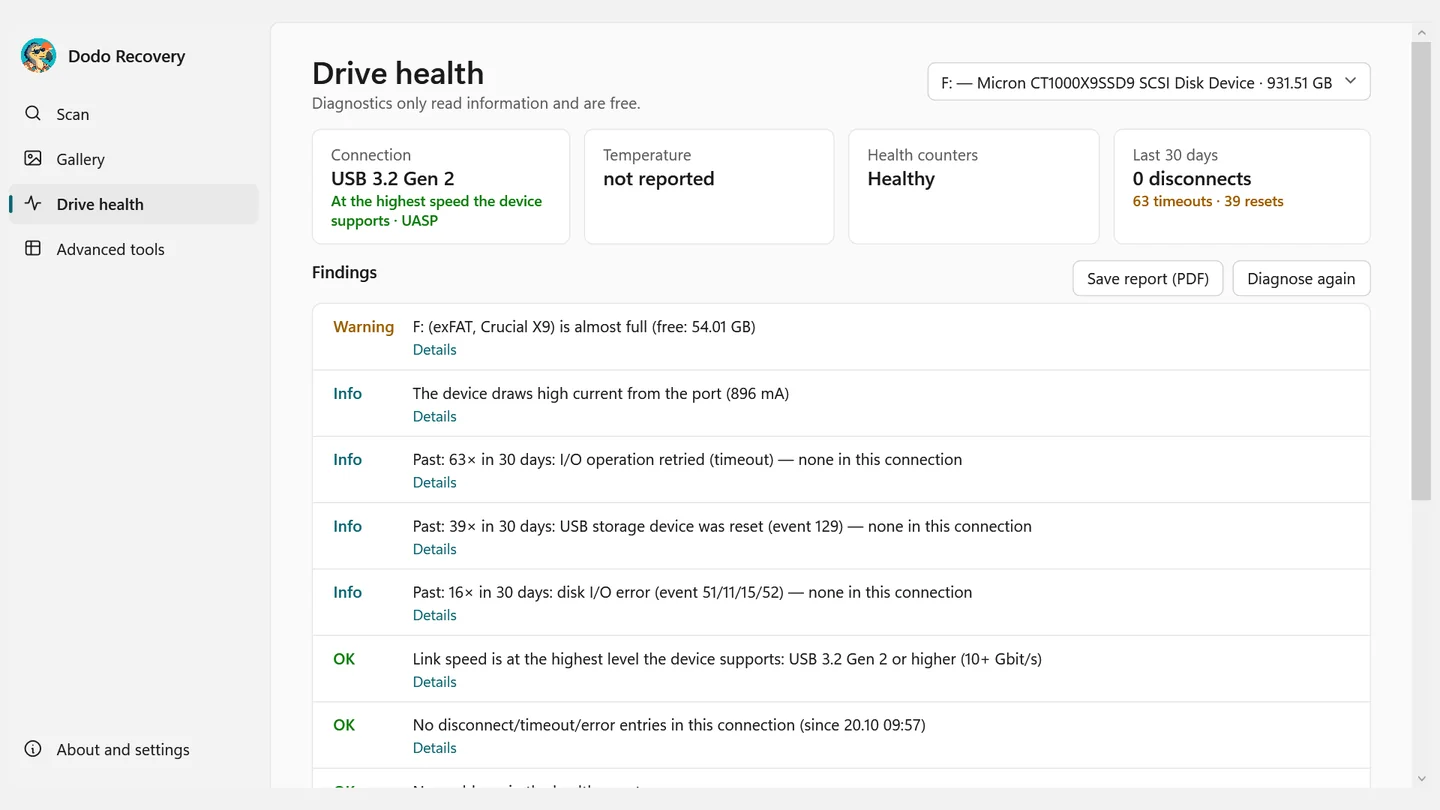
USB link speed, UASP, temperature, health counters and the last 30 days of disconnects and errors on one page, plus speed, freeze and fake capacity tests.
exFAT, FAT32 and NTFS
Deleted files are found with their names, folders and dates. A damaged card can be repaired, and the repair can be undone.
Formats
Found even on formatted cards
Every format on this list was tested with real camera files or samples made with the real encoder.
Camera RAW
- ARRIRAW
- ARRIRAW HDE
- ARRICORE
- REDCODE RAW (R3D)
- Nikon R3D NE
- Nikon N-RAW
- Blackmagic RAW
- Apple ProRes RAW
- Canon Cinema RAW Light
- Sony X-OCN
Video and containers
- ProRes 422 · HQ · LT · Proxy
- ProRes 4444 · XQ
- DNxHD
- DNxHR
- AVC-Intra
- H.264
- H.265
- CineForm
- JPEG 2000
- FFV1
- MXF OP1a · OP-Atom
- MOV · MP4
- AVI · MKV
Image sequences and audio
- DPX
- OpenEXR
- TIFF
- PNG
- WAV
- Broadcast WAV
- RF64
Project and color
- DaVinci Resolve .drp · .drt
- ALE
- EDL
- FCPXML
- CDL · CC · CCC
- ACES AMF
- CUBE · 3DL
Photos
- JPEG
- CR2 · CR3
- NEF
- ARW
- DNG
- RAF
- and other RAW formats
How it works
Insert the card, see what's there, bring it back
1 · Scan
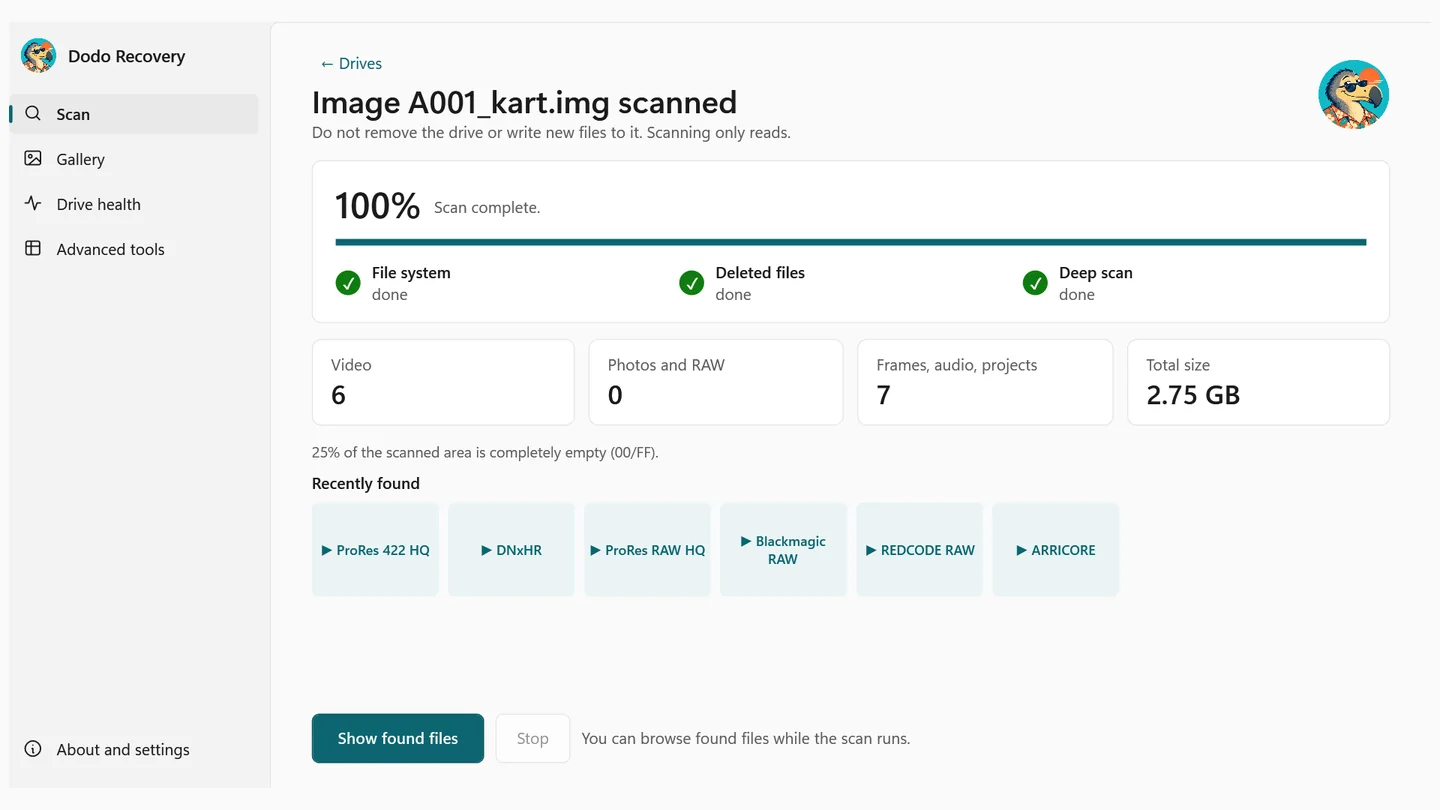
Put the card in a reader and select it in Dodo. Found files appear while the scan is still running.
2 · See
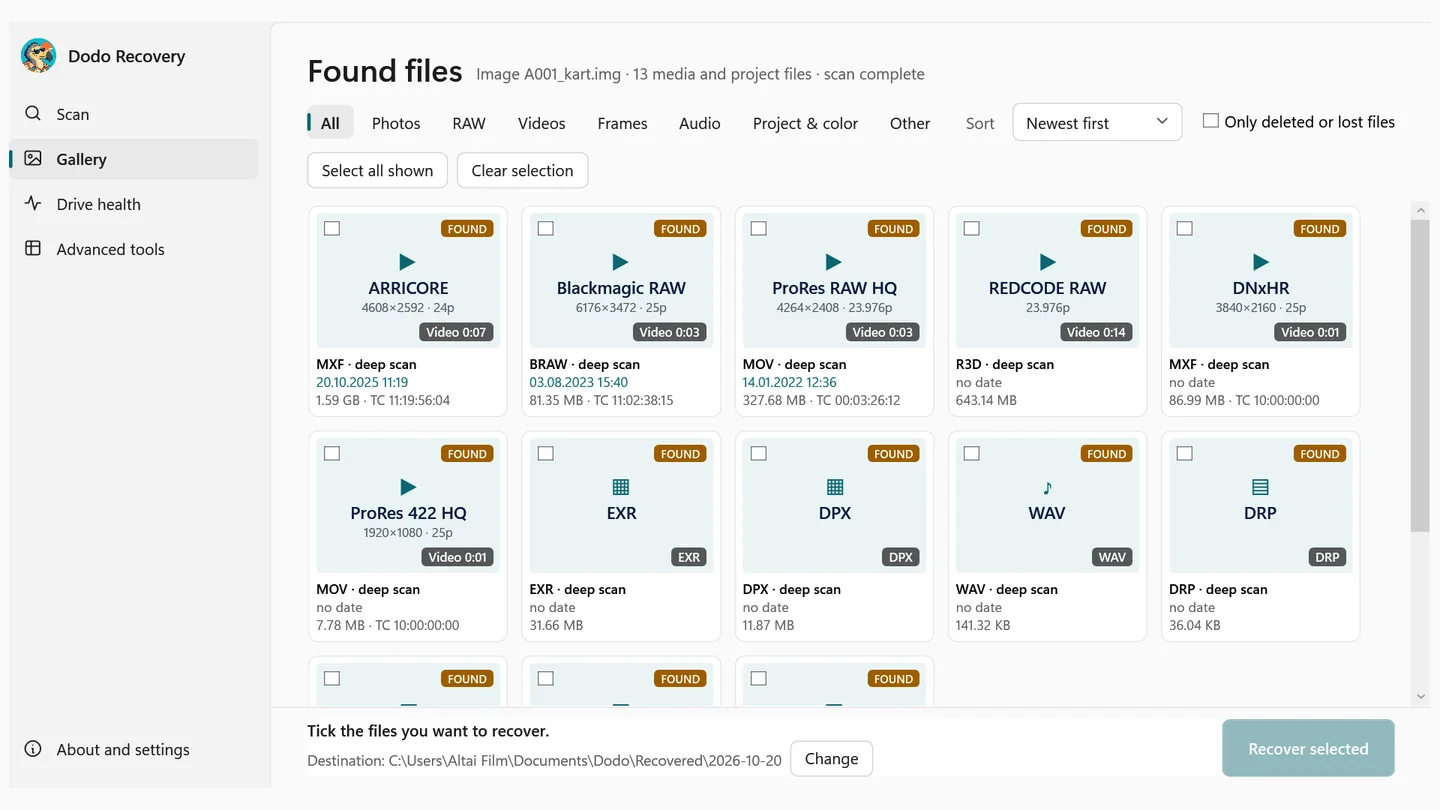
The gallery lists every clip with its codec, resolution, frame rate and timecode. Filter video, image sequences, audio and project files separately. Everything up to here is free.
3 · Bring back
Tick the clips you want and recover them to another drive. Files are named by capture date. Create a PDF report with SHA-256 hashes if you need one.
The result
They're back.
The card was formatted by mistake, the camera shut down mid-take, or the card won’t open on the computer. Dodo Recovery finds the lost clips, shows each one with its codec and timecode before you pay, and brings them back to another drive. It never writes a single byte to the card.

Dear edit suite,
You thought card A001 was formatted. All six clips are here, timecodes too. See you soon.
- ToEdit suite
- FromCard A001

Interrupted recording repair
If the camera shut down, the take isn't gone
If a recording is cut off, the footage is usually still on the card. Dodo makes the recording playable again.
- You choose a healthy clip shot on the same camera with the same settings as the reference.
- If the reference doesn’t match, Dodo doesn’t repair and tells you why.
- The broken file is never written to. The repaired recording is a new file.
Supported: ProRes, ProRes RAW (including Atomos recorders), DNxHD/DNxHR, Blackmagic RAW, Canon Cinema RAW Light, Nikon N-RAW and R3D NE, H.264 and H.265; MOV and MP4 recordings with PCM audio, including NTSC frame rates. Recordings with AAC audio (phones, some action cameras) and with B-frames aren’t supported yet; Dodo tells you before it starts.

Compare
Your options when a card goes missing
| Dodo Recovery | Data recovery lab | Reshoot | |
|---|---|---|---|
| When does it start? | Right away, on set or in the edit suite | After the card is shipped and assessed | When the crew, cast and location are booked again |
| Does the card leave your hands? | No | Yes | Not needed |
| Do you see what was found before paying? | Yes, with codec and timecode | Depends on the lab | Not applicable |
| Repairs interrupted recordings? | Yes | Depends on the lab | Not applicable |
| Delivery report | PDF, SHA-256 for every file | Depends on the lab | None |
| Cost | One price, lifetime, 2 computers | A separate fee for every job | The full cost of a shoot day |
If the card is physically damaged (cracked, wet, not seen by any reader), a data recovery lab is the right place. If the card can be read, Dodo shows you what can come back for free first; it’s worth a look before you ship the card.
Who it’s for
Everyone who touches a card, from set to edit
DITs and data wranglers
Recover a card that was formatted by mistake or corrupted during offload, right on set, and document the delivery with a SHA-256 report.
Cinematographers and camera assistants
Make a take that was cut off by a dead battery playable, and know which clip came back by its camera and timecode.
Editing and post-production
Bring back lost project files, LUTs, ALEs and EDLs, DPX and EXR sequences.
Production and insurance
Decide with a report that shows, file by file, what was recovered.
Photographers
RAW and JPEG photos appear in the gallery with their real capture date and camera model.
Drone pilots
Bring back a recording that stopped mid-flight, along with the preview and flight data files left on the card.
Screenshots
Dodo at a glance
Choose the drive
Scan
Gallery with codec, resolution and timecode
They’re back
Drive health
Imaging and interrupted recording repair
License and language
Safety
Recovery shouldn't make the card worse
Read-only
Scanning and preview never write to the card. Recovered files can’t be saved to the same drive that was scanned.
Image first
For a card that throws read errors, take an exact image first and run every attempt on the copy. The card is read once.
Repairs you can undo
The only operation that writes to the card runs after your explicit confirmation and saves an undo file first.
Pricing
Scan first, buy Dodo Pro if you like what you see
- Install Dodo from the Microsoft Store for free. Scanning, preview, drive diagnostics and tests are always free and unlimited.
- The trial includes 3 file recoveries and 3 fixes (interrupted recording repair or card repair).
- Dodo Pro unlocks every recovery and repair feature without limits. One price, lifetime, 2 computers.
- Dodo 1.x updates are included with Dodo Pro and arrive automatically through the Store.
- You can remove the license from one computer and activate it on another (About → Remove from this computer).
Dodo Pro
Microsoft Store · one-time payment · 2 computers
The price varies by country and is shown in the Microsoft Store.
Prices are shown in your local currency in the Microsoft Store, taxes included.
- Every recovery and repair feature without limits
- Lifetime license, 2 computers
- Dodo 1.x updates included
- Email support
Payment, invoicing and refunds go through the Microsoft Store. For company, invoiced or volume licenses, email us. For the Mac version, request a quote.
System requirements
What Dodo needs
| Operating system | Windows 10 (version 2004 or later) or Windows 11, 64-bit |
|---|---|
| Permissions | Administrator rights (Windows asks at launch) |
| Drives | USB-attached card readers (SD, microSD, CFexpress), USB flash drives, external SSDs and disks; disk image files |
| File systems | exFAT, FAT32, NTFS |
| Recovery destination | Enough free space on a drive other than the one being scanned |
| Internet | For installation and purchase; Dodo Pro is activated once and then works offline |
| Languages | English and Turkish |
FAQ
Common questions
Can footage really come back from a formatted card?
Usually, yes. If the data was physically wiped it can’t come back; Dodo tells you before you pay.
I formatted the card and then shot on it. What now?
Old data in the space taken by the new footage can’t come back. Clips in the remaining space can be found. Stop using the card as soon as you notice.
What do I see before I pay?
The full scan result: each clip’s codec, resolution, frame rate, timecode, length and camera. Photos open in a large preview.
Does Dodo write anything to the card?
No. Scanning, preview and recovery are read-only. The only operation that writes to a card is card repair, which runs after your explicit confirmation and saves an undo file first.
What do I need to repair an interrupted recording?
A healthy clip shot on the same camera with the same resolution, frame rate and codec. If the reference doesn’t match, Dodo doesn’t repair and tells you why.
Windows wants me to format the card.
Don’t. Click Cancel and open Dodo.
My format isn't on the list.
The list shows the formats we’ve verified with real samples, and it grows with updates. Tell us which format you need.
How many computers can I use Dodo Pro on?
Two. To move to a third computer, choose About → Remove from this computer on one of them.
Do I need an internet connection?
Not for scanning or recovery. Activating Dodo Pro on a computer for the first time needs the internet once.
Are my files sent anywhere?
No. Your files, their names and your drive information never leave your computer. Details are in the privacy policy.
Can I get a refund?
You see the scan result for free before you buy. Refunds for Microsoft Store purchases are handled by Microsoft under the Microsoft Store’s rules.
Is there a Mac version?
A Mac version is in the works and will be downloaded from this site. For a price quote for Mac, write to us through the contact form.
Privacy
Your footage stays with you
Files never leave your computer
Dodo doesn’t send the contents or names of the files it scans and recovers anywhere.
No ads, no tracking
Dodo doesn’t collect usage statistics or show ads.
Activated once
When Dodo Pro is activated, only the Store key, an anonymous device ID, the computer name and the version are sent. Details: Privacy policy.
Need help?
Write to us with your question, suggestion or problem. If you are writing after a recovery, attaching Dodo’s PDF report helps us help you faster.